Showing posts with label Online Forms. Show all posts

Friday, September 28, 2018

New mobile optimized user-interface for iFreeTools Creator

We are glad to roll in a new version of iFreeTools Creator with mobile optimized responsive user-interface.

Our new home page on desktop / laptops:


Our home page on mobile devices:

Free Online Database App - Home page on android mobile


Database record details page on mobile devices:


Database record add/edit form on mobile devices:


Feel free to share your feedback on the new user interface and we will refine this version further based on the same.

You can still switch to the old version using the link in the footer.

We are also been rolling out this new version to our paid single-tenant deployment customers and the process will be completed in a few more days. If you are a paid customer who has not yet received the upgrade and would like to try this out sooner, just send us an email and we will fast track the upgrade for you.

Looking to leverage the Google Cloud always free quotas? Get yourself/your-organization a single-tenant deployment of iFreeTools Creator, for an exclusive virtual private cloud hosting of your online database application. 

Tuesday, October 29, 2013

Specifying default values for form fields, using expressions

iFreeTools Creator, your easy web-based database software built for hosting on Google App Engine, now supports specifying default values for attributes in forms. The default values can be configured using the Default Value Expression in Attribute definition.


Expressions should return the result in the expected data-type. For details on using expressions, you may refer to our help docs.

Sample default value expression for each data type are given below:

Data Type

Examples

Single/Multi-line Text

  • "Velachery"
    Text values have to be provided within quotes.
  • val_from(user(), "Name")
    to set the currently logged-in user's name.
  • val_from(user(), "Email Id")
    to set the currently logged-in user's email-id.
Yes/No checkbox (Boolean)


  • True
  • False
  • val_from(user(),"Role") == "admin" to mark as Yes, if the current user has admin access.
Number Integer/Decimal numbers
  • 1
  • -2
  • 33.5
  • -44.75
  • val_from(fetch_one("Fee Details", "Year":year(), "Month":month()}), "Fees"))
    to fetch the values form an existing database record, in this case, from Fee Details entity, which matches the condition of having the Year attribute as the current year and the Month attribue as current month. From this matching record, we get the default-value from the Fees attribute.
Single line text - Choice Value

  • "Cash"
    Any of the choice values can be provided. For example, the above is valid if the choice values were : "Cheque", "Cash", "Bank Transfer"
Date
  • today()
  • today() + timedelta(5)
    to set the date value as 5 days from the current date.
Date and Time
  • now()
  • now() + timedelta(0,3600*10)
    to set the date-time value as 10 hours from the current date-time.
Image
  • key_id(val_from(fetch_one("Default Values",{}), "Default Profile Image"))
    to fetch the image form an existing database record, in this case, from Default Values entity, having an image-attribute with name as Default Profile Image.
Geographical Location (Geo Point)
  • "13.1207829,80.2377078" 
    in case you know the co-ordinates of a specific location, the value has to be provided within quotes.
  • val_from(fetch_one("Default Values",{}), "Default Location") 
    to fetch the location form an existing database record, in this case, from Default Values entity, having an geo-point-attribute with name as Default Location.
List (with string values)
  • ["English", "Spanish", "French"]
  • val_from(fetch_one("Default Values",{}), "Default Languages")
    to fetch the values from an existing database record, in this case, from Default Values entity, having an list-attribute with name as Default Languages.
Lookup field (Reference)
  • key_id(fetch_one("Teacher",{"Name":"John Smith"}))
    to fetch the values from an existing database record, in this case, from the Teacher entity, having Name as John Smith.

Hope you like our new feature. If you need assistance in using this feature or if you have suggestions, feel free to use the feedback form in our application.

Tuesday, February 21, 2012

Create Free Online Web Forms to Embed in your Website

iFreeTools Creator - your custom online database application builder, built for and hosted over Google App Engine - now supports free online web-forms, which you can link-to or embed directly in your websites. When the data is filled-in and submitted using the online forms, the data will get added directly into your iFreeTools Creator online database application, which you (and your authorized users) can sign in to access.

As part of the Entity configuration, you can now specify if you would like to enable web-forms for that entity, as highlighted in the image below.


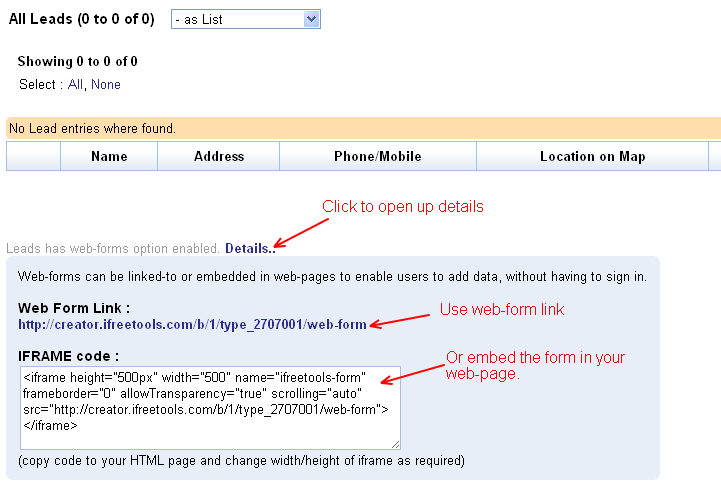
Once the online web-forms are enabled, you can get the link for the web-form and the IFRAME code in the entity's list views. You can either provide the link to the public web-form in your website / blog or you can embed the form using the IFRAME code, directly within your website.


The link / embed-code will open up the online form, for your users to enter the details. Sample public web-form accessed via the link is shown below.


Currently, as part of the free plan, you can enable web-forms for just one entity, while with paid deployments you can enable public web-forms for unlimited number of entities.

Update : It is also possible to restrict the fields in the web-form, using authorization profiles. For this you will have to..
  1. Define a new Auth Profile with permissions set for the Add operation and select the required fields. Other permissions like View / Edit / Delete / etc.,. will be ignored, when this auth-profile is used in the context of web-form.
  2. Add a new user with email-id as public-web-form-user@ifreetools.com, associating the auth-profile
Please note that having such an user-account configured will affect all the public web-forms.

Hope you find the public web-forms support useful in your database application.