We are happy to announce the availability of two new features which have been requested by many users recently.
iFreeTools Creator is built-for and hosted-over Google App Engine. Each record stored within the BigTable datastore of App Engine has its own unique key, which is automatically generated. (Note: This key-id value is not guaranteed to be increasing in sequential-order, but for uniqueness alone).
Until now it was not possible in iFreeTools to make use of this auto-generated key-id in formula fields, as this will not be available when the new record is yet to be saved into the database. But we have now made this possible by allocating the id values and making them available via a new function key_id, detailed below..
You can make use of this key_id function in your formula fields to generate a visible unique-id for your data. May be, a issue-id / ticket-id / customer-id / etc.,. like Ticket ID having a formula expression as "TICKET-" + str(key_id()) will generate values of the form TICKET-42322212, assuming you enable keyword-indexing for this field (see below), you can quickly search for this ticket from the full database.
Support for keyword-indexing, enabling better search
Extending our earlier support for alphabetical-indexing, supported in Single-line text (String) and Lookup (Reference) data-type attributes, we have now added support for indexing the keywords.
This has been added for attributes of Single-line text (String), Multi-line text (Text), List (with String values), Lookup (Reference) and numeric data-types..


When a field is marked for keyword-indexing, iFreeTools will split out the words from the field and store them in a keyword-index, when the record is saved to the database. Later, when searching for records in the list views, apart from the instant-search within the loaded batch, you will be provided with an option to search for the keywords from all records in the database.
While new records will be automatically indexed for the keywords, for older records, you can use the Re-Index All option available under More Actions in the list views.
Hope you like new features. Keep sending in your suggestions on how you believe we can improve your favorite online database app.
- Access to auto-generated ID in formula-field expressions
- Support for keyword-indexing, enabling better search
iFreeTools Creator is built-for and hosted-over Google App Engine. Each record stored within the BigTable datastore of App Engine has its own unique key, which is automatically generated. (Note: This key-id value is not guaranteed to be increasing in sequential-order, but for uniqueness alone).
Until now it was not possible in iFreeTools to make use of this auto-generated key-id in formula fields, as this will not be available when the new record is yet to be saved into the database. But we have now made this possible by allocating the id values and making them available via a new function key_id, detailed below..
key_id Usage : key_id(instance=None)Description : Returns a key-id for the currently added / modified record, if instance parameter is not supplied. If instance parameter is supplied, returns the key-id for the instance.Example : key_id() returns the currently added / updated records key-id key_id (val("Customer")) returns the key_id for the Customer field, assuming Customer is a reference attribute.
You can make use of this key_id function in your formula fields to generate a visible unique-id for your data. May be, a issue-id / ticket-id / customer-id / etc.,. like Ticket ID having a formula expression as "TICKET-" + str(key_id()) will generate values of the form TICKET-42322212, assuming you enable keyword-indexing for this field (see below), you can quickly search for this ticket from the full database.
Support for keyword-indexing, enabling better search
Extending our earlier support for alphabetical-indexing, supported in Single-line text (String) and Lookup (Reference) data-type attributes, we have now added support for indexing the keywords.
This has been added for attributes of Single-line text (String), Multi-line text (Text), List (with String values), Lookup (Reference) and numeric data-types..


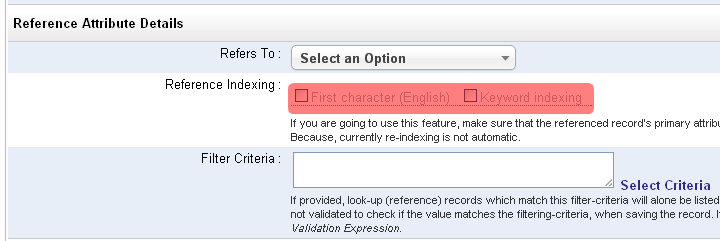

When a field is marked for keyword-indexing, iFreeTools will split out the words from the field and store them in a keyword-index, when the record is saved to the database. Later, when searching for records in the list views, apart from the instant-search within the loaded batch, you will be provided with an option to search for the keywords from all records in the database.
While new records will be automatically indexed for the keywords, for older records, you can use the Re-Index All option available under More Actions in the list views.
Hope you like new features. Keep sending in your suggestions on how you believe we can improve your favorite online database app.


