Showing posts with label Attachments. Show all posts

Tuesday, May 27, 2014

Attach files or folders from Google Drive to your database records

Following our recent back-end changes in iFreeTools, we are now glad to enhance our Google Docs attachment feature, to now support attaching any files/folder from within Google Drive.

Earlier, it was possible to attach limited file types alone from Google Docs (document, spreadsheet, presentation and PDF), like shown below :


With the recent upgrade and subsequent changes, we have moved to using latest version of Google services and have integrated with Google Drive API.

This has enabled us to allow attaching any of the files or folders from within Google Drive, including Microsoft file formats, Google drawings, standard images files and zip files.


The attached files or folders will get listed under the database record's details page.

Like in the earlier implementation, the attachment process does not duplicate the file contents, but creates an association with the database record within iFreeTools, so that you can access the latest version from within the record's details page. The sharing permissions configured for the file/folder in Google Drive will hence remain enforced.


Hope you like the new feature. Feel free to send in your feedback on how you think we can make things better for you in iFreeTools.

Tuesday, August 30, 2011

Now available : Data aggregation in list/chart views, Data-access & Caching functions and more..

Over the month we have rolled-in the following features in your free online database app builder and free online crm, built over Google App Engine for use with Google Apps.
  1. Data aggregation in list views & chart views
  2. Data access and Caching functions
  3. Search for files to attach from Google Docs

Data aggregation in list views & chart views

Numeric attributes (integer and float types) can now have a Default Aggregation configured to display the sum of the fields' values in the list views and in the chart views.

In our iFreeTools CRM, our free CRM app for use with Google Apps, we have enabled this for fields in Expected Revenue, Budgeted Cost and Actual Cost fields in Campaigns and for Amount and Expected Revenue in Opportunities.

The summation of the values from such fields will be listed below the list view as shown in the image below..


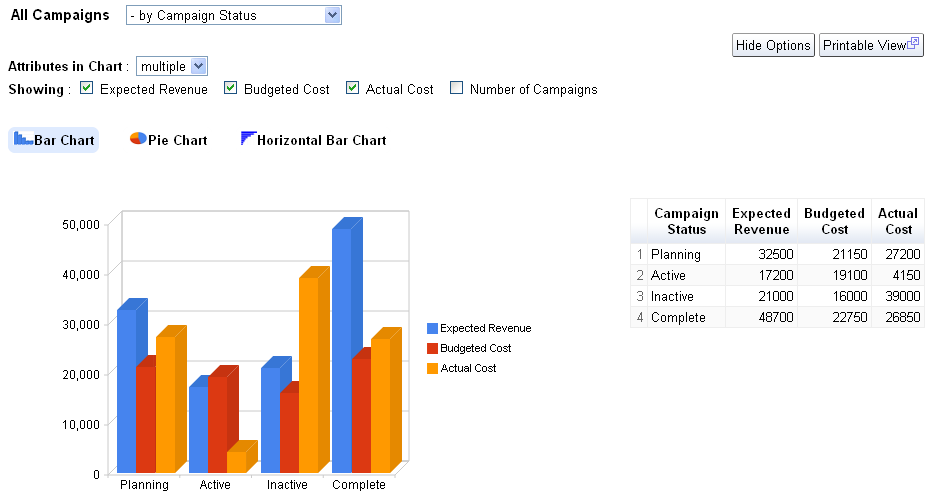
Along with this we have also enabled the result of aggregation from multiple attributes to be rendered in the same graph, so that you can compare related aggregation values visually.

The following image shows the chart views for Campaigns enabled to display values from 3 attributes, Expected Revenue, Budgeted Cost and Actual Cost, grouped by Campaign Status..


For your custom online database apps, built over iFreeTools creator you can specify this configuration in the Attribute form, when you add/edit the attribute details.

Note : All aggregation / charting features are currently restricted to work with smaller batch of data. When our Scheduled Reports feature is available, you can create summary / charts for full set of data.

Data-access and Caching functions

New data-access and caching functions listed below have been now added for use with expressions.

user
Usage : user()
Description : Returns the currently logged in user

fetch_one
Usage : fetch_one(entity_name, criteria)
Description : Returns a record for the given entity_name and filtering criteria
Example : fetch_one("Car", {"Company":"Honda", "Name":"City"}) will fetch a record from the entity having Display Name as Car and for the filtering condition to get the record for Honda City.

val_from
Usage : val_from(instance, prop_name)
Description : Returns a value of a property from the given instance.
Example : val_from(user(), "emailId") will return the current user's email-id, where emailId is the alias for the "Email Id" attribute in User system-entity.

cache
Usage : cache(name, expr)
Description : To cache the result of evaluation of expression expr with the given name.

cached_val
Usage : cached_val(name)
Description : Returns the value which was added to cache previously with the given name.


For more details, refer to Data Access and Cache Functions section the user guide.

Search for files to attach from Google Docs

When attaching files from Google Docs to your records, you now have the option to search for the required file based on text, to narrow down the files and attach the required file to your record.


Hope you like the new features.

Do keep sending in your suggestions on how we can make things better in your free online database app builder.

Friday, March 18, 2011

Attach Google Docs to Database Records in iFreeTools CRM & Creator

Our CRM for Google Apps and Online Database App Creator for Google Apps now support attaching of Google Docs to the records within the database.

Update :
We have upgraded this feature to support attaching any file / folder from within Google Drive. More details are available in this blog post : Attach files or folders from Google Drive to your database records.

Below the record details in the details page, there is now an option to attach a file from Google Docs. When you click on the Attach a Google Document button, you will be required to authorize the Google Docs account to use, this can be a Google Docs account associated with either Google user account or with a Google Apps user account.

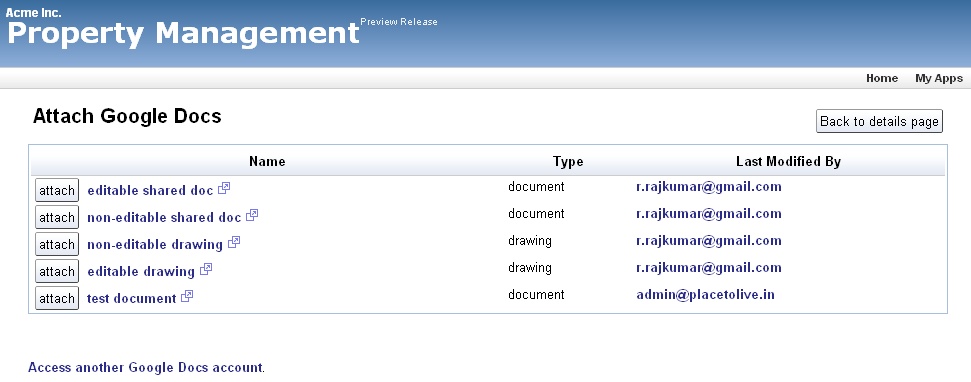
After authorization you can view the list of files in that Google Docs account, with details like the file name, file type and the person who last modified it as shown in the image below..


Just click on the attach button and the file will now be linked to your database record.

All such attachments will be listed below the record details, as shown below..


Attaching a file in Google Docs does not duplicate the contents, but directly links to the document in your Google Docs, making sure the latest doc can be accessed from the record.

The security settings set in the Google Docs are still applicable and you need not have to duplicate those setting again. When someone clicks on the attachment link, they are taken to Google Docs directly which handles the security settings.

Update :When attaching files from Google Docs to your records, you now have the option to search for the required file based on text, to narrow down the files and attach the required file to your record, as shown in the image below.


Hope you find this new feature useful. Keep sending in your suggestions.