- Data aggregation in list views & chart views
- Data access and Caching functions
- Search for files to attach from Google Docs
Data aggregation in list views & chart views
Numeric attributes (integer and float types) can now have a Default Aggregation configured to display the sum of the fields' values in the list views and in the chart views.In our iFreeTools CRM, our free CRM app for use with Google Apps, we have enabled this for fields in Expected Revenue, Budgeted Cost and Actual Cost fields in Campaigns and for Amount and Expected Revenue in Opportunities.
The summation of the values from such fields will be listed below the list view as shown in the image below..

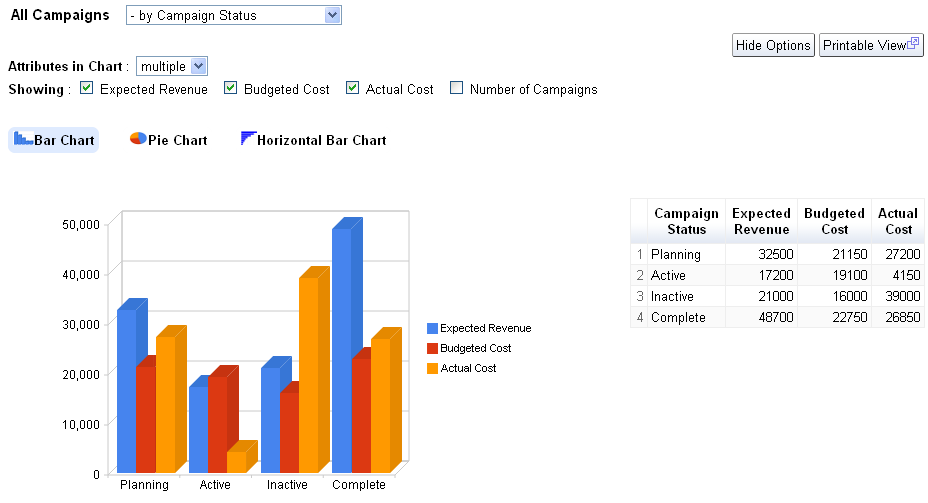
Along with this we have also enabled the result of aggregation from multiple attributes to be rendered in the same graph, so that you can compare related aggregation values visually.
The following image shows the chart views for Campaigns enabled to display values from 3 attributes, Expected Revenue, Budgeted Cost and Actual Cost, grouped by Campaign Status..

For your custom online database apps, built over iFreeTools creator you can specify this configuration in the Attribute form, when you add/edit the attribute details.
Note : All aggregation / charting features are currently restricted to work with smaller batch of data. When our Scheduled Reports feature is available, you can create summary / charts for full set of data.
For more details, refer to Data Access and Cache Functions section the user guide.

Hope you like the new features.
Do keep sending in your suggestions on how we can make things better in your free online database app builder.
The summation of the values from such fields will be listed below the list view as shown in the image below..

Along with this we have also enabled the result of aggregation from multiple attributes to be rendered in the same graph, so that you can compare related aggregation values visually.
The following image shows the chart views for Campaigns enabled to display values from 3 attributes, Expected Revenue, Budgeted Cost and Actual Cost, grouped by Campaign Status..
For your custom online database apps, built over iFreeTools creator you can specify this configuration in the Attribute form, when you add/edit the attribute details.
Note : All aggregation / charting features are currently restricted to work with smaller batch of data. When our Scheduled Reports feature is available, you can create summary / charts for full set of data.
Data-access and Caching functions
New data-access and caching functions listed below have been now added for use with expressions.user
Usage : user()
Description : Returns the currently logged in user
fetch_one
Usage : fetch_one(entity_name, criteria)
Description : Returns a record for the given entity_name and filtering criteria
Example : fetch_one("Car", {"Company":"Honda", "Name":"City"}) will fetch a record from the entity having Display Name as Car and for the filtering condition to get the record for Honda City.
val_from
Usage : val_from(instance, prop_name)
Description : Returns a value of a property from the given instance.
Example : val_from(user(), "emailId") will return the current user's email-id, where emailId is the alias for the "Email Id" attribute in User system-entity.
cache
Usage : cache(name, expr)
Description : To cache the result of evaluation of expression expr with the given name.
cached_val
Usage : cached_val(name)
Description : Returns the value which was added to cache previously with the given name.
For more details, refer to Data Access and Cache Functions section the user guide.
Search for files to attach from Google Docs
When attaching files from Google Docs to your records, you now have the option to search for the required file based on text, to narrow down the files and attach the required file to your record.
Hope you like the new features.
Do keep sending in your suggestions on how we can make things better in your free online database app builder.


