Showing posts with label iFreeTools Creator. Show all posts

Friday, July 29, 2011

Date-Time and Error Functions now available for use within Expressions

Your favorite online database app builder tool over Google App Engine - iFreeTools Creator, now supports date-time functions within formula field expressions and in validation expressions.

The new date-time functions made available are listed below :


now
Usage : now ()
Description : Returns a datetime object having the current time.

date
Usage : date(year, month, day)
Description : Returns a date object for the given year, month and day values.

datetime
Usage : datetime (year, month, day, hours=0, minutes=0, seconds=0)
Description : Returns a datetime object for the given parameters. If hours, minutes and seconds are not provided, they will be taken to be 0 (zero).

timedelta
Usage : timedelta (days=0, seconds=0, microseconds=0)
Description : Returns a timedelta object representing a difference in time, for the given days, seconds and microseconds. Can be used to add or subtract date/datetime values.
Example: now() + timedelta(1) will give tomorrow's date and time.


We have also added support for raising error messages when validating values using expressions. Apart from detailing on how to enter the value for the field in the description, this function will enable you to specify the reason for the validation failing.


error
Usage : error(error_msg)
Description : Raises an error with the given error_msg. This will be shown in the form for the corresponding attribute which failed the validation expression.


We have also rolled in a new home page for iFreeTools Creator, now highlighting the important features available in the platform.


Keep sending in your valuable suggestions on how you think we can make iFreeTools better for you.

Tuesday, January 25, 2011

"List" data type, now supported in Online Database App Creator

Our online database app creator, which is built over Google App Engine for use with Google Apps, now allows users to define and use List fields.

In this blog post, we will showcase this new feature by adding 2 list attributes to our sample Property Management app.

List attribute without choice values

We will add a new attribute to list down the facilities available in the managed properties in our database. When adding the attribute select the Data Type as List (with String values).


Defining a new attribute with the List data-type will result in a simple text-box for data-entry where one can enter comma separated values. These values will be parsed and stored as a list in that entity instance.

In our case the facilities can be something like Covered Car Park, 24x7 Security. This will get stored internally within Google App Engine's data-store as a list value with two items, [Covered Car Park, 24x7 Security].

We will be coming up with auto-complete to help fill in list fields in forms, at a later date.

List attribute with choice values

One can also specify the choice values for the List. When choice values are provided, the form will have a list of check-boxes - one each for each choice value. Making use of choice values also enables creating Custom Views based on this attribute, as well as including them in automatic chart view options.

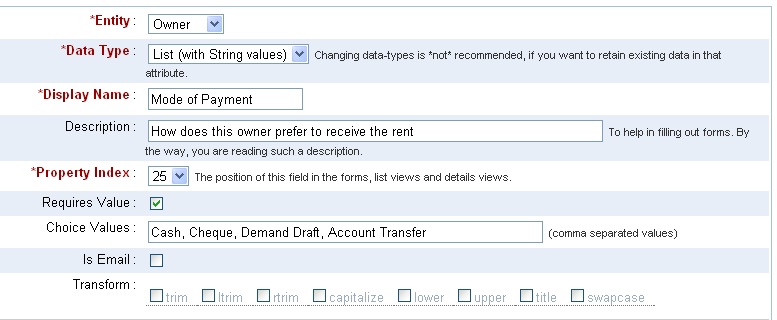
We will define a List attribute to store the preferred mode of payment for the Owners, as shown below.


The form generated, for this List property with choice values, will have check-boxes for each of those choice items. The user can select one or more values, each of which will be added to the List field of that record instance.


The chart view will make use of the choice values to generate the Bar charts.

Notice that the total need not match the number of records because each record may have more than one value. For this reason, the pie-charts have also been disabled.

Hope you find the List data-type useful in your online database app over iFreeTools Creator. Do let us know your suggestions and feedback.

Wednesday, September 1, 2010

Image fields now supported in the Free Online Database builder for Google Apps

We have now added support for defining and using Image fields in iFreeTools. This has been enabled for the Products database in iFreeTools CRM and can also be used for your custom online databases, using iFreeTools Creator.

A sample view of such a database listing is given below in a snapshot of a Travel Desk application built using iFreeTools Creator. The thumbnails of the images are listed in this table view..


When you proceed to the individual record's details page, you can see a bigger image..


When adding/editing records, you have options to either upload a new image or using an already uploaded image from the database of uploaded files. The options available for editing the image fields are show in this below image..


All uploaded files can be managed easily from Back-end Data > Uploaded Files, where CSV files used in importing data are also listed..


You could rename the files and change the descriptions or even, download the file from the details page..


When adding/editing the attribute you could specify the maximum file size for the image. For free versions the options available are 10, 25, 50 and 75 (all sizes in KB). If the uploaded image is of bigger size, the app will try to resize and reduce the file size to confirm to your settings..


You can go in for bigger image sizes when we open up our paid plans or if you go in for our custom deployment options, which enables you to use the 1 GB free quota from Google and to purchase additional resources directly from Google at $0.15/GB/month.

The rates for custom deployments start at $99/year (works out to $8.25/month) for upto 25 users (or $0.33/user/month). For unlimited users, it is just $299/year.

Hope you like our new feature. Do feel free to send in your suggestions using the feedback form in our apps or directly via mail to raj@sahasvat.com

Thursday, May 27, 2010

Feature Preview : Email Templates and Bulk Emails

We are now working on have rolled in a new feature for iFreeTools, which is Email Templates and Bulk Emails.

Email Templates enable you to automate mailing work by allowing you to define templates, which can include fields from the records and then to send out mails with their values replaced (mail-merge).

This new feature will now be supported for records which have an Email attribute.

For iFreeTools CRM, this will include Lead, Contact, Vendor and Case records.

And, for iFreeTools Creator - where one can create their own custom database application online - String attributes can now be marked as email and will automatically get this feature enabled for those Entities.

The following screen-shot image shows Owner's Email ID property, from the sample app used in our walk-through for using iFreeTools Creator, being marked as an Email Property. The transform function is also used to trim the values to remove spaces and convert it to lower-case.

Similarly, we can also mark the Tenant's Email ID property.

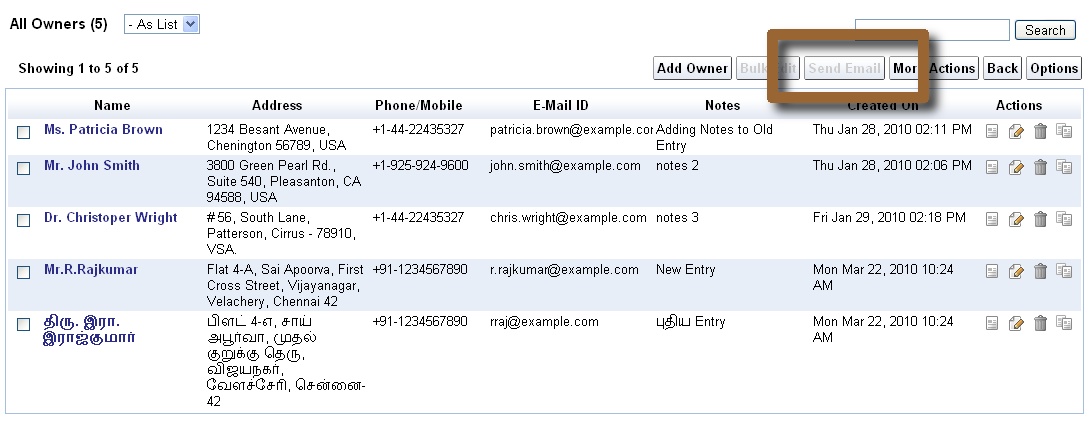
Once this is marked, a new action button will become available in the list views. For the CRM app, as mentioned earlier, this has been pre-configured for Leads, Contacts, Vendors and Cases.

In the above view, the option is disabled, because no records have been selected.

Let us select a few records to proceed to check out how this feature would work. Shown below are 3 record selected before triggering Send Email


The default view will be as given below. Since this is a preview release of the feature, the message on the top informs you that Notification Tasks will alone be added in Preview status - which means actual emails will not be sent, for now.

You will have an option to just send an email once or to save the template providing the name, description, type of email and sharing options. Admin users can create templates for themselves or for all users, like it is possible with our Custom Views and Custom Actions.

We will now proceed to create a Welcome Email template, and make it available for all users. One can include fields from the records, which are listed on the left on the content box and can be clicked to be inserted into the contents. You can also use BBCode. The supported BBCode tags are : b, i, u, s (strike), url, quote, img, list with *, size, color, center, code and p.

Fields are supported within mail subject too, as shown in the screen-shot below..


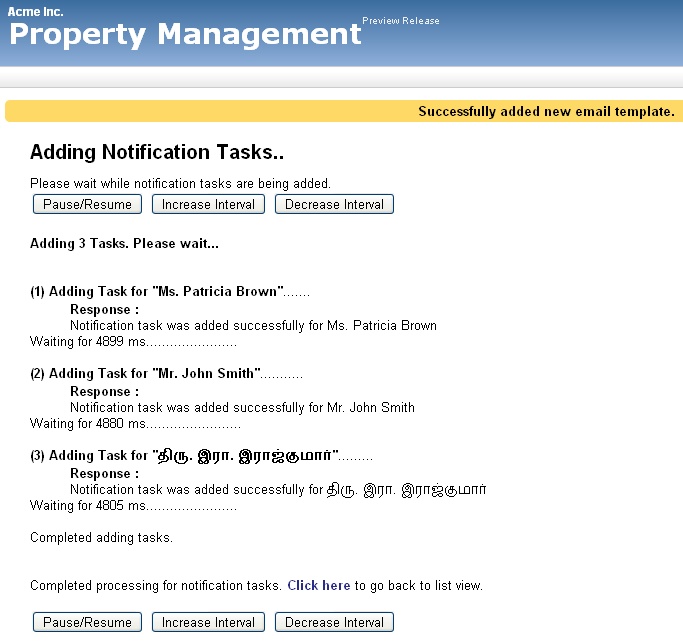
Proceeding to send email, you will see a page as shown below. Notice the message on the top, that the email template has been added. The notification tasks will be added sequentially for each of the record instances.


Let us now check for the results.

Clicking on the Notification Templates, we find the template listed..


Proceeding to the Notification Tasks view, we find 3 records present with status as Preview. Also notice how the values have been replaced with actual values from Owner records.


And, this is one of the Notification Task's details view..


Notice that I had done a mistake in my template code by providing HTML instead of BBCode for the content "Personal Executive" - happens when switching between writing a blog post and the app, taking screen shots :-). Anyway, we can edit the template to correct this, which we will be doing now while explaining another important feature, which is Automatic Dupe Detection for Bulk-Emails.

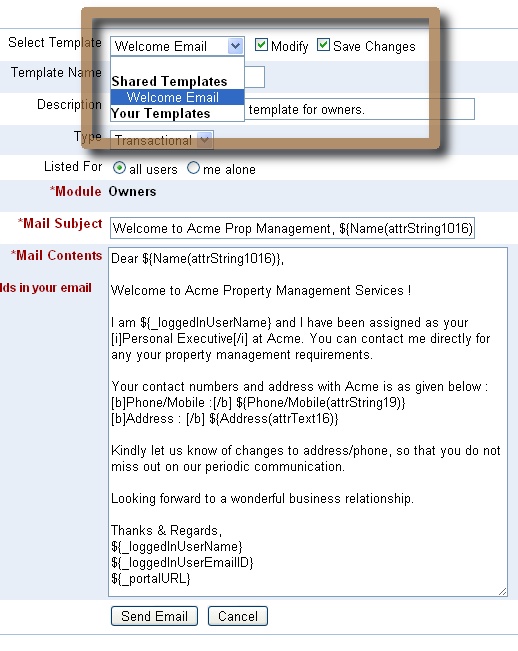
To explain how Automatic Dupe Detection for Bulk-Emails works, we will again trigger the Send Email from the Owners list view with all the records selected and proceed to the email-template view as given below. Now, select the template from the selection box and click on Modify and Save options next to that box. Edit the content as required and then proceed.


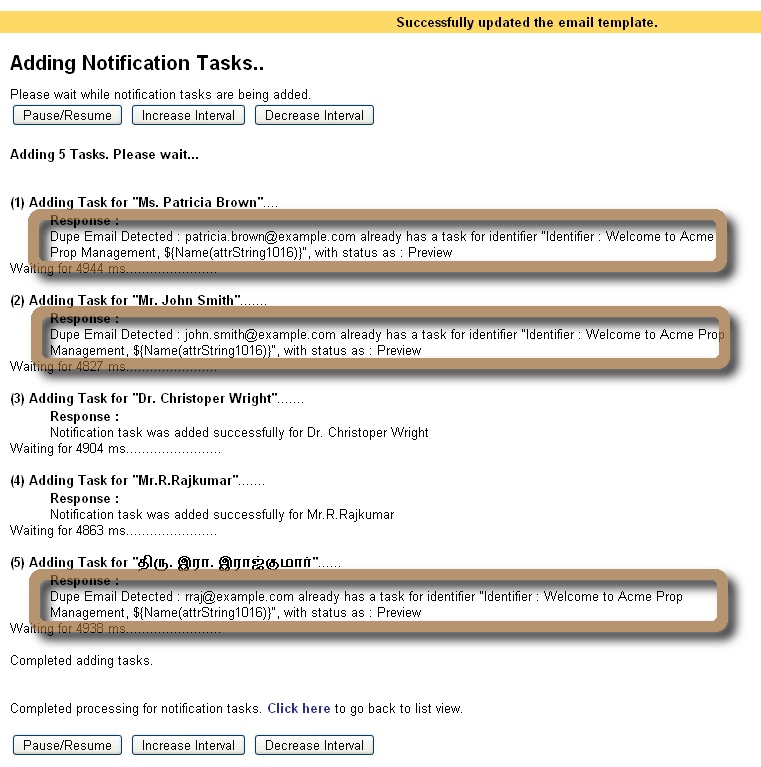
In the subsequent page, we will see the results for the notification tasks being added, as shown below. The engine will detect dupe emails based on the notification identifier, which for now is taken to be the subject of the email. So, notification tasks will be added only for those records which have not already been mailed with the same subject.


This is a preview release of the Email Templates and Bulk Emails feature. When this is fully enabled, the tasks would have triggered emails and end up with status as Executed.

(Update : Bulk emails feature has been fully enabled for all paid, single-tenant deployments.)

For each of the notified users, a record will be added in Notified Users, under Admin. This will be used to enable users to opt-out of notifications, if they prefer to do so - confirming to CAN-SPAM regulations for Promotional emails.

We plan to integrate with SMS gateways too, which will follow the similar flow, except that the Subject will be ignored and the Content will have to be short.

(Update : Bulk SMS from your online database has also been enabled, by integrating iFreeTools with Twilio.)

Play around with our iFreeTools and let us know your feedback on how we can make things better.

Monday, March 22, 2010

Export / Import Data as CSV & Bulk Delete in iFreeTools CRM and Creator

A new upgrade to our Google App Engine powered CRM application and Online Database App-creator, has added support for Exporting and Importing data in CSV format, along with support for bulk-delete.

Exporting and Importing of data as CSV enables you to
  • store a backup of your data
  • import new data in bulk
  • restore back old-data at a later date, if required, from the back-up
  • take away your data at any time from our database - No vendor locks.

In this blog post, we will have an overview of this new feature, as used in iFreeTools Creator, the approach will be similar in iFreeTools CRM too.

In the default list views, there will now be an option under More Actions to Export as CSV and Import from CSV as shown below..


First export the data as a CSV file and store it locally. This file acts as a backup of the existing data and can also be used as a template to add new data.

You can use any spreadsheet application which supports editing of CSV files. We will use Google Docs for this feature preview. Use the upload option to upload the CSV file to Google Docs..


The spreadsheet will be loaded and will show the entries as present in the iFreeTools database..


We can now add / modify entries in the spreadsheet. We will add 2 new records - of which 1 record will have values in unicode (Tamil language) and update the existing records by adding some notes. The changes made to the spreadsheet are highlighted in the image below..


Now download the modified file from Google Docs, by choosing from the menu File > Download as > CSV (current sheet). Now you can upload the file to iFreeTools. Choose the Import from CSV option and specify the file downloaded from Google Docs and click on Import..


This will import the data into iFreeTools' database, as shown below..

Notice that 2 new entries have been added, with proper handling for unicode characters and that 3 existing records have been updated with notes. The status message on top also provides the details of the import.

Further changes to the imported data can be performed using the Bulk Edit feature, which was added recently.

This update also includes the Bulk Delete option, available under More Actions.

Hope you like our new features. If you face any issues or have suggestions, feel free to use the feedback form in our application.

Friday, March 5, 2010

Custom Actions now supported in Google App Engine powered iFreeTools CRM and Creator

When we added the Bulk Edit feature recently to our Google App Engine powered CRM and our Online Application Builder for App Engine, we had mentioned that we were to make "Custom Actions" available next.

And with today's upgrade, it is now available.

When performing bulk operations, you will now have an option to provide a name for the bulk-edit operation. For admin users one can additionally specify if the Custom Action needs to be available for all users or just for you. In the sample screen-shot below, we are adding a Rented-out custom action, which sets Vacant property as False (unchecked in form)..

And after this proceed with the bulk-edit operation as usual. This will apply the bulk-edit changes and also create a custom action which will be available under More Actions, as shown below.. In the screen-shot the bulk-action buttons (Bulk Edit and Rented-out) will remain disabled, until one or more rows are selected.

You can get to know more details of the Custom Actions by clicking on Action Details. This will list the details of the accessibility of the Custom Action, along with details on the attributes that get changed by the action and if you have the privileges, an option to delete the action, as shown in the image below..

While one can also provide the same custom action name in the bulk-edit form to update an existing custom action, it is just as easy to just delete the action and add it again.

Hope you like the new feature. Feel free to send in your feedback.

Wednesday, March 3, 2010

Building a simple Issue-tracker application on Google App Engine.. Online.

In this blog post we will walk through the steps in creating a simple issue-tracker application over Google App Engine, using iFreeTools Creator.

Login into iFreeTools Creator (no signup required, your Google Account is sufficient) to start building the application.

The overview of the steps involved..

Edit App Settings under Admin and rebrand your application..


As you might notice, there are options to further rebrand the application providing your logo and also to map the application to your Google Apps sub-domain. But we will leave that for now.

Add an entity to store the Bug / Issue details..

We have allowed the viewing of bug database for guest role users. While to create/edit/delete bug entries, they need to have user or admin role.

Add required attributes..

Our Bug database requires to store the following attributes..
  • Tester
  • Title
  • Description
  • Steps to reproduce
  • Severity
  • Date logged
  • Date closed
  • Notes


Add Tester attribute as a reference to User system-entity..


Notice that the attribute data-type for Tester is Reference and the referenced entity is User - which is a system entity.

Similarly add Title as a String and, Description and Steps to reproduce as a Text attributes. Next will be define Severity..

Adding severity with options to choose from..

The options provided are Critical, Major, Minor and Cosmetic.

Proceed to add Date logged and Date closed attributes with data-type as Date.

That is it.

Now, we are ready to start using our Bug-Tracker App

The form for adding a bug will look like the one given below..

Once added, the bugs will get listed in a Bugs list view..


You may also add users, whom you want to provide access. Just provide their email-id associated with a Google Account. Sample user entries added to the application..


Users with guest role can only view the bug lists. While users with admin and user roles can add modify bug details.

Now we can proceed to add more more bug entries to our bug database..


iFreeTools Creator automatically detects attributes which can be used for charts and provides them readily accessible. The data can be visualized in 3 chart types - Horizontal and Vertical (column) Bar charts and Pie Charts.

Bar Chart visualization..


Pie Chart visualization..


Hope you like the features in iFreeTools Creator. If you have any further queries, feel free to write to raj@sahasvat.com or use our feedback form.

Related :
Also See :

Monday, February 8, 2010

Easy Visualization of Data with Auto-Charts in iFreeTools CRM & Creator

Automatic Chart View options are now available for all views -- pre-defined views, as well as Custom Views -- in our free CRM and app-creator for Google App Engine.

iFreeTools will automatically detect attributes which can be used to group data together and enable auto-charting options for those attributes, as shown below..


This feature is added to our core engine layer and hence available to both iFreeTools CRM and iFreeTools Creator applications. The following screen shot shows charting options in the Property Management application, we had built in our walk-through for iFreeTools Creator..


Current aggregation operation used is count - count of records, grouped by another attribute. We will soon be supporting other options like sum, which will be more useful when we introduce currency data-types.

Go ahead and check out our auto-charting feature available in.. and let us know your feedback.

Friday, January 29, 2010

Build Apps Online, over Google App Engine, using iFreeTools Creator

We are happy to announce the Preview Release of iFreeTools Creator, which was mentioned in our previous post (What's Cooking : iFreeTools "Brahma").

iFreeTools Creator is probably the first Google App Engine based online application builder. It provides users the access to iFreeTools Engine, which powers our Free CRM application.

Let us see how to create a simple Property Management application using iFreeTools Creator..

Configure App Settings

First configure the App Settings under Admin to provide your Organization's name and the applications name. For our example, we will call Acme Inc.'s Property Management.


(Other aspects of rebranding are as mentioned in iFreeTools CRM on your sub-domain, with rebranding !!)

Add Required Entities

Now proceed to Entities module under Admin and click on Add Entity. You will get a form to enter the details, as given below. Provide details of Entity and save the record.


Likewise we will create 3 entities Property, Owner and Tenant. The entities will get listed in the "Custom Entities" view as given below..


The Entity Index property defines the dependency and listing order.

Add Attributes for Entities

Now you can proceed to add the attributes for those entities. From Admin::Attributes, click on Add Attribute and fill in the form..


Likewise we can add relevant attributes for all entities. Given below are the attributes we added for the 3 entities...

Owner Attributes


Property Attributes


Tenant Attributes


The Property Index decides the order of the attribute items in list, form and details pages.

Start using the application

That is it. You can now start using the Property Management application. The below image shows the "Properties" view with sample data..


You can always customize it, as and when business needs change. Go ahead, play with the Online Application Creator for Google App Engine.

We do have plans to add more features, including support for more data types, chart views like those available in our CRM application and more. And, we would like to hear your feedback too. You can either use the feedback form in the application or send a mail directly to raj@sahasvat.com.

Related :
Building a simple Bug-tracker application on Google App Engine

Also See :
Custom Actions now supported in Google App Engine powered iFreeTools CRM and Creator