Showing posts with label Online Database. Show all posts

Tuesday, January 25, 2011

"List" data type, now supported in Online Database App Creator

Our online database app creator, which is built over Google App Engine for use with Google Apps, now allows users to define and use List fields.

In this blog post, we will showcase this new feature by adding 2 list attributes to our sample Property Management app.

List attribute without choice values

We will add a new attribute to list down the facilities available in the managed properties in our database. When adding the attribute select the Data Type as List (with String values).


Defining a new attribute with the List data-type will result in a simple text-box for data-entry where one can enter comma separated values. These values will be parsed and stored as a list in that entity instance.

In our case the facilities can be something like Covered Car Park, 24x7 Security. This will get stored internally within Google App Engine's data-store as a list value with two items, [Covered Car Park, 24x7 Security].

We will be coming up with auto-complete to help fill in list fields in forms, at a later date.

List attribute with choice values

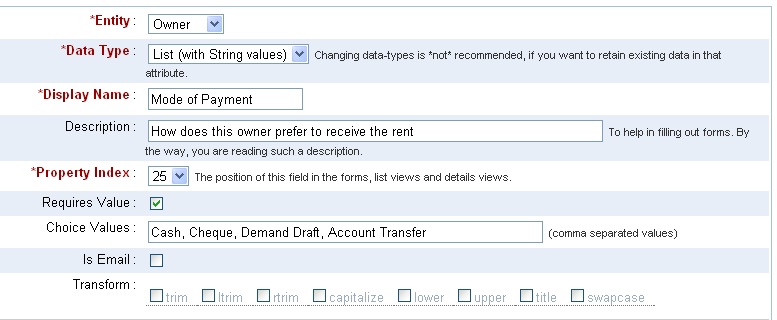
One can also specify the choice values for the List. When choice values are provided, the form will have a list of check-boxes - one each for each choice value. Making use of choice values also enables creating Custom Views based on this attribute, as well as including them in automatic chart view options.

We will define a List attribute to store the preferred mode of payment for the Owners, as shown below.

The form generated, for this List property with choice values, will have check-boxes for each of those choice items. The user can select one or more values, each of which will be added to the List field of that record instance.


The chart view will make use of the choice values to generate the Bar charts.

Notice that the total need not match the number of records because each record may have more than one value. For this reason, the pie-charts have also been disabled.

Hope you find the List data-type useful in your online database app over iFreeTools Creator. Do let us know your suggestions and feedback.

Wednesday, September 1, 2010

Image fields now supported in the Free Online Database builder for Google Apps

We have now added support for defining and using Image fields in iFreeTools. This has been enabled for the Products database in iFreeTools CRM and can also be used for your custom online databases, using iFreeTools Creator.

A sample view of such a database listing is given below in a snapshot of a Travel Desk application built using iFreeTools Creator. The thumbnails of the images are listed in this table view..


When you proceed to the individual record's details page, you can see a bigger image..


When adding/editing records, you have options to either upload a new image or using an already uploaded image from the database of uploaded files. The options available for editing the image fields are show in this below image..


All uploaded files can be managed easily from Back-end Data > Uploaded Files, where CSV files used in importing data are also listed..


You could rename the files and change the descriptions or even, download the file from the details page..


When adding/editing the attribute you could specify the maximum file size for the image. For free versions the options available are 10, 25, 50 and 75 (all sizes in KB). If the uploaded image is of bigger size, the app will try to resize and reduce the file size to confirm to your settings..


You can go in for bigger image sizes when we open up our paid plans or if you go in for our custom deployment options, which enables you to use the 1 GB free quota from Google and to purchase additional resources directly from Google at $0.15/GB/month.

The rates for custom deployments start at $99/year (works out to $8.25/month) for upto 25 users (or $0.33/user/month). For unlimited users, it is just $299/year.

Hope you like our new feature. Do feel free to send in your suggestions using the feedback form in our apps or directly via mail to raj@sahasvat.com