Showing posts with label Online Apps. Show all posts

Wednesday, September 1, 2010

Image fields now supported in the Free Online Database builder for Google Apps

We have now added support for defining and using Image fields in iFreeTools. This has been enabled for the Products database in iFreeTools CRM and can also be used for your custom online databases, using iFreeTools Creator.

A sample view of such a database listing is given below in a snapshot of a Travel Desk application built using iFreeTools Creator. The thumbnails of the images are listed in this table view..


When you proceed to the individual record's details page, you can see a bigger image..


When adding/editing records, you have options to either upload a new image or using an already uploaded image from the database of uploaded files. The options available for editing the image fields are show in this below image..


All uploaded files can be managed easily from Back-end Data > Uploaded Files, where CSV files used in importing data are also listed..


You could rename the files and change the descriptions or even, download the file from the details page..


When adding/editing the attribute you could specify the maximum file size for the image. For free versions the options available are 10, 25, 50 and 75 (all sizes in KB). If the uploaded image is of bigger size, the app will try to resize and reduce the file size to confirm to your settings..


You can go in for bigger image sizes when we open up our paid plans or if you go in for our custom deployment options, which enables you to use the 1 GB free quota from Google and to purchase additional resources directly from Google at $0.15/GB/month.

The rates for custom deployments start at $99/year (works out to $8.25/month) for upto 25 users (or $0.33/user/month). For unlimited users, it is just $299/year.

Hope you like our new feature. Do feel free to send in your suggestions using the feedback form in our apps or directly via mail to raj@sahasvat.com

Thursday, May 27, 2010

Feature Preview : Email Templates and Bulk Emails

We are now working on have rolled in a new feature for iFreeTools, which is Email Templates and Bulk Emails.

Email Templates enable you to automate mailing work by allowing you to define templates, which can include fields from the records and then to send out mails with their values replaced (mail-merge).

This new feature will now be supported for records which have an Email attribute.

For iFreeTools CRM, this will include Lead, Contact, Vendor and Case records.

And, for iFreeTools Creator - where one can create their own custom database application online - String attributes can now be marked as email and will automatically get this feature enabled for those Entities.

The following screen-shot image shows Owner's Email ID property, from the sample app used in our walk-through for using iFreeTools Creator, being marked as an Email Property. The transform function is also used to trim the values to remove spaces and convert it to lower-case.

Similarly, we can also mark the Tenant's Email ID property.

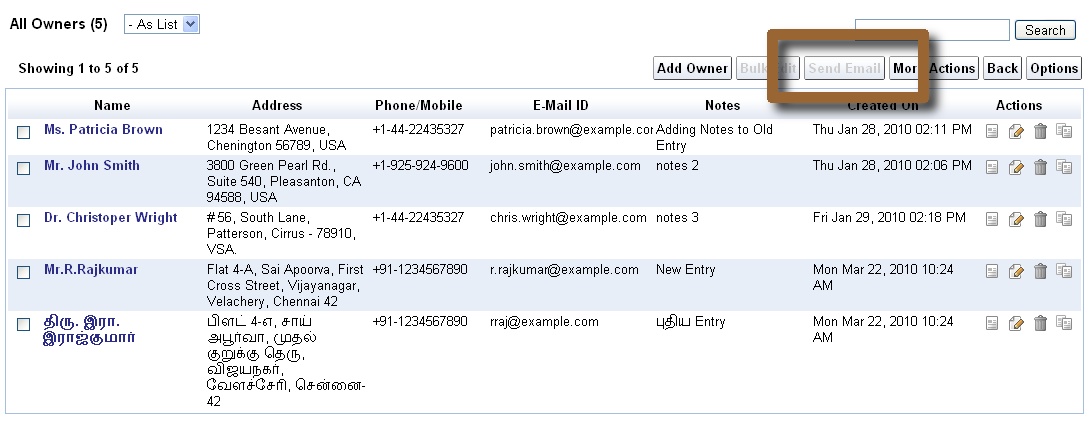
Once this is marked, a new action button will become available in the list views. For the CRM app, as mentioned earlier, this has been pre-configured for Leads, Contacts, Vendors and Cases.

In the above view, the option is disabled, because no records have been selected.

Let us select a few records to proceed to check out how this feature would work. Shown below are 3 record selected before triggering Send Email


The default view will be as given below. Since this is a preview release of the feature, the message on the top informs you that Notification Tasks will alone be added in Preview status - which means actual emails will not be sent, for now.

You will have an option to just send an email once or to save the template providing the name, description, type of email and sharing options. Admin users can create templates for themselves or for all users, like it is possible with our Custom Views and Custom Actions.

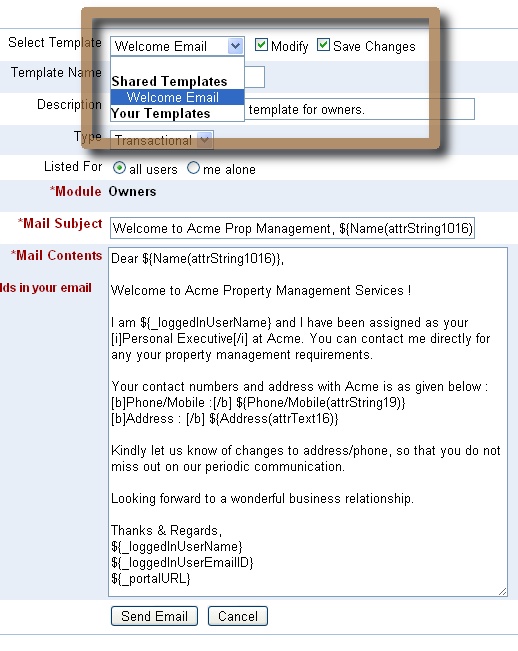
We will now proceed to create a Welcome Email template, and make it available for all users. One can include fields from the records, which are listed on the left on the content box and can be clicked to be inserted into the contents. You can also use BBCode. The supported BBCode tags are : b, i, u, s (strike), url, quote, img, list with *, size, color, center, code and p.

Fields are supported within mail subject too, as shown in the screen-shot below..


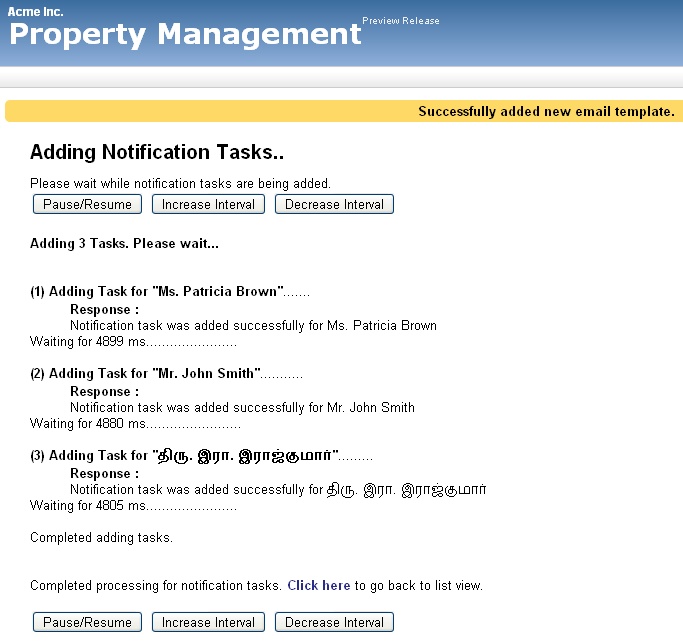
Proceeding to send email, you will see a page as shown below. Notice the message on the top, that the email template has been added. The notification tasks will be added sequentially for each of the record instances.


Let us now check for the results.

Clicking on the Notification Templates, we find the template listed..


Proceeding to the Notification Tasks view, we find 3 records present with status as Preview. Also notice how the values have been replaced with actual values from Owner records.


And, this is one of the Notification Task's details view..


Notice that I had done a mistake in my template code by providing HTML instead of BBCode for the content "Personal Executive" - happens when switching between writing a blog post and the app, taking screen shots :-). Anyway, we can edit the template to correct this, which we will be doing now while explaining another important feature, which is Automatic Dupe Detection for Bulk-Emails.

To explain how Automatic Dupe Detection for Bulk-Emails works, we will again trigger the Send Email from the Owners list view with all the records selected and proceed to the email-template view as given below. Now, select the template from the selection box and click on Modify and Save options next to that box. Edit the content as required and then proceed.


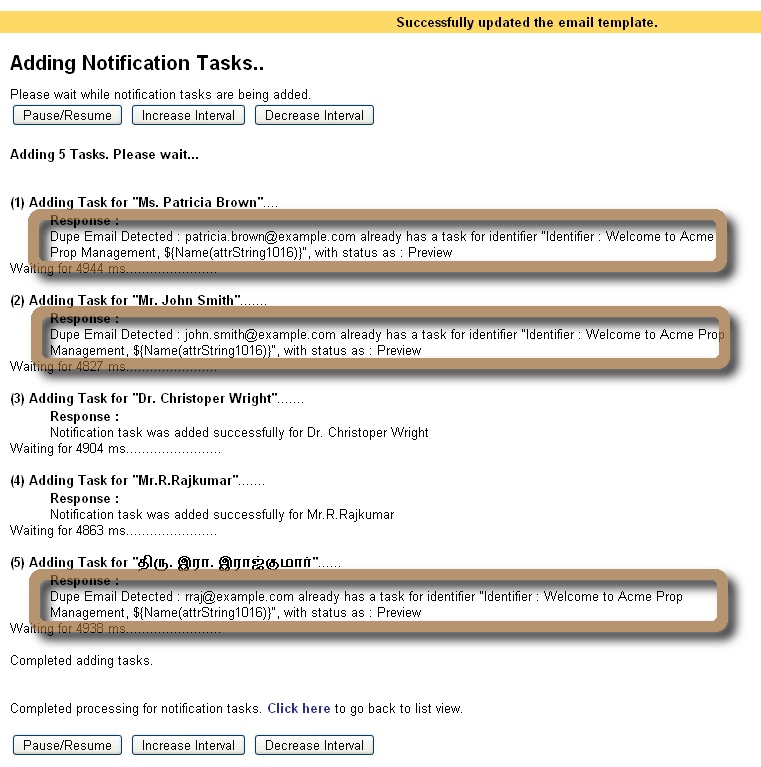
In the subsequent page, we will see the results for the notification tasks being added, as shown below. The engine will detect dupe emails based on the notification identifier, which for now is taken to be the subject of the email. So, notification tasks will be added only for those records which have not already been mailed with the same subject.


This is a preview release of the Email Templates and Bulk Emails feature. When this is fully enabled, the tasks would have triggered emails and end up with status as Executed.

(Update : Bulk emails feature has been fully enabled for all paid, single-tenant deployments.)

For each of the notified users, a record will be added in Notified Users, under Admin. This will be used to enable users to opt-out of notifications, if they prefer to do so - confirming to CAN-SPAM regulations for Promotional emails.

We plan to integrate with SMS gateways too, which will follow the similar flow, except that the Subject will be ignored and the Content will have to be short.

(Update : Bulk SMS from your online database has also been enabled, by integrating iFreeTools with Twilio.)

Play around with our iFreeTools and let us know your feedback on how we can make things better.

Friday, April 2, 2010

Support for Unique Field Constraints in iFreeTools

Though Google App Engine does not yet support modifiable unique fields, we believe that this is an important requirement for many business apps. So, we have added this feature in our framework layer over Google App Engine to enable unique fields in our Free CRM for Google Apps Engine and in our online database app-builder for Google App Engine.

This feature has been turned on for the email-id fields in iFreeTools CRM - for Lead, Vendor, Contact and User records. The value entered for these fields will be trimmed to remove spaces and converted to lower case, before a unique constraint check is performed, when adding or modifying records.

We will see how this feature can be used in a custom application over iFreeTools Creator. Vehicle registration details in one case where unique values are to be stored for each of the vehicle records. You do not want a duplicate entry to be entered inadvertently into your database. So for the this field, we will enable the Unique constraint and also use the transformation functions trim and upper.


Now, we will proceed to add a record with a duplicate value for this unique field. Notice how the value is given in a lower case and with additional spaces prefixed and suffixed..


When trying to save this record, we will be shown the error message as given in the image below. You will also find that the value has been trimmed and turned to upper-case..


The unique constraints are also enforced during bulk import of data from CSV.

Hope you find the feature useful. Feel free to send in your feedback.

Friday, January 29, 2010

Build Apps Online, over Google App Engine, using iFreeTools Creator

We are happy to announce the Preview Release of iFreeTools Creator, which was mentioned in our previous post (What's Cooking : iFreeTools "Brahma").

iFreeTools Creator is probably the first Google App Engine based online application builder. It provides users the access to iFreeTools Engine, which powers our Free CRM application.

Let us see how to create a simple Property Management application using iFreeTools Creator..

Configure App Settings

First configure the App Settings under Admin to provide your Organization's name and the applications name. For our example, we will call Acme Inc.'s Property Management.


(Other aspects of rebranding are as mentioned in iFreeTools CRM on your sub-domain, with rebranding !!)

Add Required Entities

Now proceed to Entities module under Admin and click on Add Entity. You will get a form to enter the details, as given below. Provide details of Entity and save the record.


Likewise we will create 3 entities Property, Owner and Tenant. The entities will get listed in the "Custom Entities" view as given below..


The Entity Index property defines the dependency and listing order.

Add Attributes for Entities

Now you can proceed to add the attributes for those entities. From Admin::Attributes, click on Add Attribute and fill in the form..


Likewise we can add relevant attributes for all entities. Given below are the attributes we added for the 3 entities...

Owner Attributes


Property Attributes


Tenant Attributes


The Property Index decides the order of the attribute items in list, form and details pages.

Start using the application

That is it. You can now start using the Property Management application. The below image shows the "Properties" view with sample data..


You can always customize it, as and when business needs change. Go ahead, play with the Online Application Creator for Google App Engine.

We do have plans to add more features, including support for more data types, chart views like those available in our CRM application and more. And, we would like to hear your feedback too. You can either use the feedback form in the application or send a mail directly to raj@sahasvat.com.

Related :
Building a simple Bug-tracker application on Google App Engine

Also See :
Custom Actions now supported in Google App Engine powered iFreeTools CRM and Creator