Showing posts with label Google Apps. Show all posts

Tuesday, May 27, 2014

Attach files or folders from Google Drive to your database records

Following our recent back-end changes in iFreeTools, we are now glad to enhance our Google Docs attachment feature, to now support attaching any files/folder from within Google Drive.

Earlier, it was possible to attach limited file types alone from Google Docs (document, spreadsheet, presentation and PDF), like shown below :


With the recent upgrade and subsequent changes, we have moved to using latest version of Google services and have integrated with Google Drive API.

This has enabled us to allow attaching any of the files or folders from within Google Drive, including Microsoft file formats, Google drawings, standard images files and zip files.


The attached files or folders will get listed under the database record's details page.

Like in the earlier implementation, the attachment process does not duplicate the file contents, but creates an association with the database record within iFreeTools, so that you can access the latest version from within the record's details page. The sharing permissions configured for the file/folder in Google Drive will hence remain enforced.


Hope you like the new feature. Feel free to send in your feedback on how you think we can make things better for you in iFreeTools.

Friday, March 18, 2011

Attach Google Docs to Database Records in iFreeTools CRM & Creator

Our CRM for Google Apps and Online Database App Creator for Google Apps now support attaching of Google Docs to the records within the database.

Update :
We have upgraded this feature to support attaching any file / folder from within Google Drive. More details are available in this blog post : Attach files or folders from Google Drive to your database records.

Below the record details in the details page, there is now an option to attach a file from Google Docs. When you click on the Attach a Google Document button, you will be required to authorize the Google Docs account to use, this can be a Google Docs account associated with either Google user account or with a Google Apps user account.

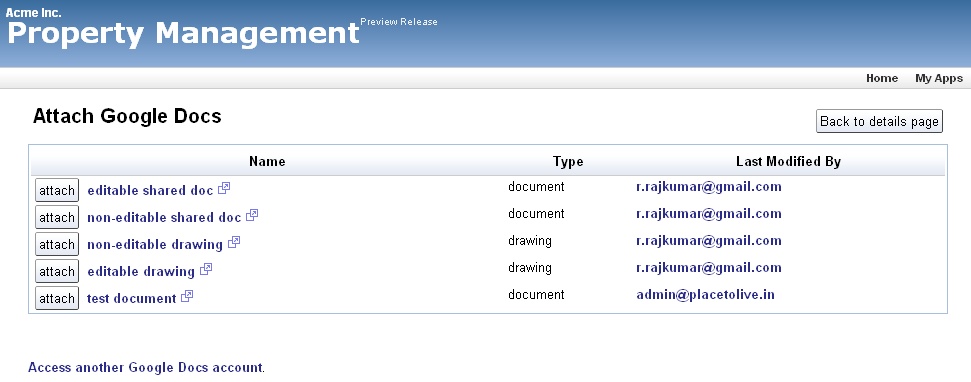
After authorization you can view the list of files in that Google Docs account, with details like the file name, file type and the person who last modified it as shown in the image below..


Just click on the attach button and the file will now be linked to your database record.

All such attachments will be listed below the record details, as shown below..


Attaching a file in Google Docs does not duplicate the contents, but directly links to the document in your Google Docs, making sure the latest doc can be accessed from the record.

The security settings set in the Google Docs are still applicable and you need not have to duplicate those setting again. When someone clicks on the attachment link, they are taken to Google Docs directly which handles the security settings.

Update :When attaching files from Google Docs to your records, you now have the option to search for the required file based on text, to narrow down the files and attach the required file to your record, as shown in the image below.


Hope you find this new feature useful. Keep sending in your suggestions.

Monday, May 31, 2010

iFreeTools now opens up for all Google Apps User Accounts

iFreeTools CRM - our free CRM built over Google App Engine and iFreeTools Creator - our free online database application builder, which were - until now - open only to users with Google Accounts, have now been opened up to allow all Google Apps users directly.

Thanks to adopting new features enabled recently by Google, for its Google App Engine platform, Google Apps users need not look for work-arounds and request separate deployments to use iFreeTools.

Users can also continue to login with Google Accounts, as before.

Once user has logged in using either Google Accounts or Google Apps User Accounts, our app will check for the email-id of the logged-in user to identify the user and to authorize operations. We also plan to enable full OpenID support, very soon.

What was until now just "CRM for Google App Engine" is now happy to call itself the "CRM for Google Apps, built over Google App Engine".

Hope you find our new feature useful. Feel free to check out our apps and send in your feedback.

Friday, March 5, 2010

Custom Actions now supported in Google App Engine powered iFreeTools CRM and Creator

When we added the Bulk Edit feature recently to our Google App Engine powered CRM and our Online Application Builder for App Engine, we had mentioned that we were to make "Custom Actions" available next.

And with today's upgrade, it is now available.

When performing bulk operations, you will now have an option to provide a name for the bulk-edit operation. For admin users one can additionally specify if the Custom Action needs to be available for all users or just for you. In the sample screen-shot below, we are adding a Rented-out custom action, which sets Vacant property as False (unchecked in form)..

And after this proceed with the bulk-edit operation as usual. This will apply the bulk-edit changes and also create a custom action which will be available under More Actions, as shown below.. In the screen-shot the bulk-action buttons (Bulk Edit and Rented-out) will remain disabled, until one or more rows are selected.

You can get to know more details of the Custom Actions by clicking on Action Details. This will list the details of the accessibility of the Custom Action, along with details on the attributes that get changed by the action and if you have the privileges, an option to delete the action, as shown in the image below..

While one can also provide the same custom action name in the bulk-edit form to update an existing custom action, it is just as easy to just delete the action and add it again.

Hope you like the new feature. Feel free to send in your feedback.

Tuesday, March 2, 2010

Google Accounts & Google Apps user-accounts - authentication options in Google App Engine

The issue discussed in this specific post has been solved. We have now added support to enable Google Apps users to login directly into iFreeTools CRM & Creator.

So, no more confusions.. no more work-arounds.
You may skip this post.


This is a short note on the default authentication modes possible with Google App Engine and how we have configured it for our free CRM and our online application builder apps.

There are 2 modes in which applications can be deployed over Google App Engine..
  • Open to all Google Accounts --or--
  • Restricted to a specific Google Apps domain.

Our default application instances (with application identifiers sahasvat-ifreetools for CRM and sahasvat-ifreetools-creator for Creator) are deployed in the first mode, so as to enable access to users with normal Google Accounts.

Since Google wants to treat Google Accounts and Google Apps accounts differently, it can create confusions for users. This means that users with just a Google Apps user-account cannot login to access our default apps.

There are 2 suggested approaches for this scenario..
  • Creating a new Google Account using your Google Apps email-id and proceeding to use the application for free.
  • Have a separate application instance deployed for you over App Engine, with authentication restricted to your Google Apps domain. For details on such a custom deployment, with optional customizations, kindly refer to http://crm.ifreetools.com/about.

You may also read the following blog post which details the confusions caused by the different account types and options to have things working..
Fixing the Google Account problem [www.equalsdrummond.name].

We also plan to offer a free deployment - equivalent to the $299/year plan, but with ads - to enable Google Apps authentication for such deployments. If you are interested, use the feedback form or send an email raj@sahasvat.com to request for details on using such a deployment.

With the OpenID & OAuth support in Google App Engine's road-map, these confusions can be avoided altogether.

If you have any further queries, feel free to write to raj@sahasvat.com or use our feedback form.

The issue discussed in this specific post has been solved. We have now added support to enable Google Apps users to login directly into iFreeTools CRM & Creator.

So, no more confusions.. no more work-arounds.
You may skip this post.