Showing posts with label Customer Relationship Management. Show all posts

Wednesday, January 20, 2010

iFreeTools in The 451 Group's report on SaaS M&A

iFreeTools gets a mention in Sector IQ report titled "Buying in the cloud: Where SaaS players and others may look to make M&A moves for apps", by China Martens, dated 14 Jan 2010.

This report is filed under the sectors..
  • Application software / Customer relationship management
  • Application software / Enterprise resource planning


(click to view larger image)

Glad about being part of that report.

Not sure about the exact context or quote, but I think I can guess - based on the title. (Hint: iFreeTools will not acquire any of those companies, listed along with it.)

Tuesday, December 1, 2009

Support for Custom Views in iFreeTools

iFreeTools CRM just got an update with the new Custom Views feature.

Note : Ability to create Custom Views has also be enabled in iFreeTools Creator, our online database app builder for Google Apps. If you do not see this option when viewing the records for your custom entity, kindly verify if you have selected the Allow Custom Views option for that entity.


Clicking on the Add Custom View link available under each module of CRM, will bring up a form wherein one can provide the view name, description and the criteria to be used for filtering.

For example, to view all leads who have not been contacted yet, one can create a "Not Contacted" view as shown below..


Once the view is created, it will be listed along with the predefined views in the module..


One can also provide multiple values for the criteria.

For example, to view all Open Leads by specific owners (say, for users "Gold" and "Diamond"), one can create a view as shown below (notice multiple values in OR for Lead Owner and Lead Status)..


The resulting view will use all values in the criteria to provide the results..


Such Custom Views will be available for use by all users within the application instance, while admin users alone can create/modify/delete Custom Views.

Currently properties with choices and reference properties alone can be used in providing the filter criteria. For other filtering one can use the search within the Advanced Views, for now. We will be coming up with more options for filtering at a later upgrade.

Check out the new feature and feel free to send us your feedback.

Related Blog Posts : 

Thursday, November 12, 2009

CRM for App Engine adds Charts

iFreeTools CRM, the CRM built for Google App Engine (and hence for Google Apps), just had an upgrade which adds support for charts in the hosted CRM application.

This first step towards broader reporting features in iFreeTools CRM, begins with charts added to the Leads Module.

Now, under Open Leads, the following chart views have been added..
  • Open Leads
    • By Status
    • By Source
    • By Industry
    • By Owner


Each chart view has an option to view the summary in either bar-chart format (loaded by default) or a pie-chart format.


Note : In case you are using Firefox, make sure Firebug is disabled when using these charts as Firebug is known to slow down this charting feature.

Send in your feedback on what charts you would like to have as part of the application and we would add them in subsequent upgrades.

Within this short duration of less than month, iFreeTools CRM (alpha) has attracted a lot of users from across the world. They like the pace at which features are getting added and the personalized support. A few of them have already rebranded and mapped the application to their Google Apps domain.

So, go ahead start using the application and feel free to send in your feedback on what you would like to see soon in iFreeTools CRM.

Related Posts :

What's Cooking : Sales Opportunities Funnel Chart

Sales Opportunities Pipeline (Funnel Chart) is now available in iFreeTools CRM

Tuesday, November 10, 2009

Task Management module added to iFreeTools CRM

Google App Engine powered iFreeTools has added support for managing Tasks in its hosted CRM service.

Now users can add Tasks and associate them to other CRM records which can be Lead, Account, Contact, Opportunity, Case, Campaign, Vendor and Product.


A set of pre-defined views have also been provided for the Tasks module..
  • My Pending Tasks
  • All Pending Tasks
  • Past Due
  • Due Today
  • Due Tomorrow
  • Completed
Check out the new module and as always, keep sending in your feedback on the Free CRM for Google Apps.

Thursday, November 5, 2009

iFreeTools CRM on your sub-domain, with rebranding !!


Update (September 2016):
Google has been migrating this feature out of Google Apps to Google Cloud Console and if you domain was migrated to the latest version of Google Apps, this feature may not be available for configuration any longer.

You will still be able to go in for a paid single-tenant deployment of iFreeTools (starts at $99/year for up to 25 users), where you will get access to the Google Cloud Console of your iFreeTools deployment and can map the application to any domain (the domain need not be associated with Google Apps).

Yet another upgrade just happened at CRM for Google App Engine. This upgrade enables mapping of iFreeTools CRM service to one of your sub-domains and also to configure it with simple rebranding.

Note :
The details provided here are also applicable to iFreeTools Creator, our online database app builder for Google Apps.

Sub-domain mapping

To enable sub-domain mapping, like say http://crm.yourdomain.com, you will require to enable Google Apps for your domain and add iFreeTools app as a service.

In the old version of the Google Apps dashboard, you can click on the Get more apps and services link under Common Tasks.

In the new version of the Google Apps dashboard, you can click on Other Google Services control. If you are not seeing this control, kindly try More Controls option at the bottom of the page.


In the Other Google Services page, click on the Add Services icon, as shown below :


In the resulting page, add the Google App Engine service, by providing the App ID. The App ID for the 2 iFreeTools applications are given below :
  • iFreeTools CRM : sahasvat-ifreetools
  • iFreeTools Creator : sahasvat-ifreetools-creator


You may now proceed to configure your sub-domain, by configuring the Web address, as shown below.


You may also be required to add CNAME entries in your DNS configuration to map to ghs.google.com. These steps are not covered here. Kindly follow steps as detailed in Google Apps.

After the web-address is configured and the CNAME entries are added, you should be able to access iFreeTools service from the configured sub-domain.

Rebranding


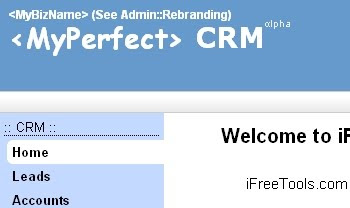
When you login into the application, you will see the header with default configuration having values which suggest you to make changes (currently it will be something like "Your-Biz-Name-Here")..


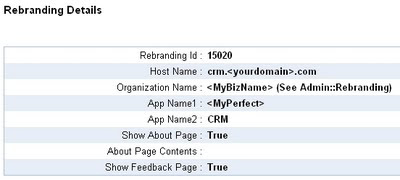
Proceed to Admin::App Settings to view the default settings currently used by the application, which will be similar to the one given below..


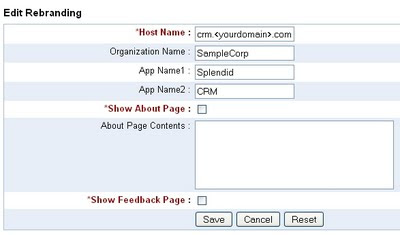
Now proceed to modify the configuration. Notice that About Page and Feedback Page have been disabled (unchecked) as part of Rebranding..


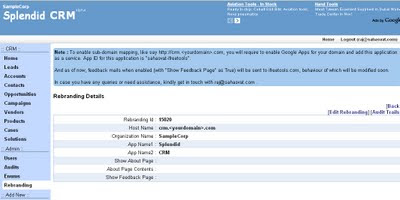
And after the modified app settings takes effect, you will see the specified names being used in the header and that the About and Feedback links are removed from the application..

As of now, feedback mails when enabled (with "Show Feedback Page" as True) will be sent to ifreetools.com, behaviour of which will be modified soon.

Hope you like the new features.

Play with the app and feel free to send in your feedback on iFreeTools CRM.

Related :
Add Logo to your Rebranded CRM

Tuesday, November 3, 2009

Customize selection values in iFreeTools CRM

iFreeTools CRM (alpha) - the CRM for Google AppEngine, just got an upgrade. With this upgrade, iFreeTools CRM has added support for defining enumerated values for selection fields.

Admin users can now define Enum values to be listed for the following selection fields..
  • lead.salutation
  • lead.leadSource
  • lead.leadIndustry
  • lead.leadRating
  • account.accountRating
  • account.accountType
  • account.accountOwnership
  • account.accountIndustry
  • contact.leadSource
  • contact.salutation
  • opportunity.type
  • opportunity.leadSource
  • campaign.campaignType
  • product.productCategory
  • case.origin
  • case.reason
For using this option, go to the Enum module under Admin and add comma-separated values for the fields. If no Enum is defined for a property, the default application level settings will be used.

Default selection values before customization


Configure values for the selection field


Selection values after customization


Defining of Enum has been disabled for the following fields, since they are used in pre-defined views.
  • lead.leadStatus
  • opportunity.stage
  • campaign.campaignStatus
  • solution.status
  • case.type
  • case.status
  • case.priority
Also, currently you will have to configure values for attribute for different modules individually. Example lead.leadSource, contact.leadSource and opportunity.leadSource will have to be configured individually. Since it is a one-time admin operation, we assumed it will be OK. Probably at a later date, we can provide a even more easier option to define once and refer in more than one field.

Check out the feature and feel free to send in your feedback on our Free CRM application.

iFreeTools CRM listed on Google App Engine's App Gallery

iFreeTools CRM (alpha) - the CRM for Google AppEngine, is now listed on Google App Engine's Application Gallery


Customized solutions over iFreeTools CRM can also be deployed to your sub-domain (like say, http://crm.yourdomain.com).

Such a deployment enables 2000 emails/day and 1GB of storage. Additional capacity can be purchased directly from Google.

For more details on custom deployment options, refer to : http://crm.ifreetools.com/about

Wednesday, October 21, 2009

iFreeTools CRM - Alpha Version

Sahasvat is happy to make available an alpha version of its CRM/SFA (Sales Force Automation) hosted solution - iFreeTools CRM

CRM/SFA will be first of the many business applications that will be made available by iFreeTools. The applications will be ad-supported and have restrictions on the storage used and on the number of mails sent.

The modules made available for this initial version are..
  • Leads
  • Accounts
  • Contacts
  • Opportunities
  • Campaigns
  • Products
  • Users

Other deployment options
If you would like to have one of the applications deployed to run on your domain, we can help you achieve the same with our professional services. Such a deployment will offer you
  • 1 GB of storage (and above)
  • 2000 emails/day (and above)
  • Rebranding
  • No advertisements
  • Additional customizations (optional)
Rates for application deployment start as low as $99/year for upto 25 users going to a maximum of $299/year for unlimited users. Customization charges are one-time only and would depend upon your requirements.

The application will be hosted in Google AppEngine and you need not have to pay more, if you stay within Google AppEngine's Free Quota. Additional usage can be purchased directly from Google at $0.15/GB/month and $0.0001/email.

iFreeTools.com is built over Google App Engine; but is not affiliated to Google.

In case you have any further queries, do get in touch with raj@sahasvat.com.