While iFreeTools already has support for database-trigger based workflow execution, which can execute tasks like sending out email or SMS, adding of new records or editing existing records in database and for re-indexing records (to recompute formula field values), there can be automation scenarios wherein some workflows need to be triggered periodically, for a specific set of records.
Examples of such scenario can include,
To enable automation for such scenarios, we have enabled support for Scheduled Workflows.
As a specific example, let us consider a subscriber database which needs to be notified about the upcoming renewal date for their subscription.
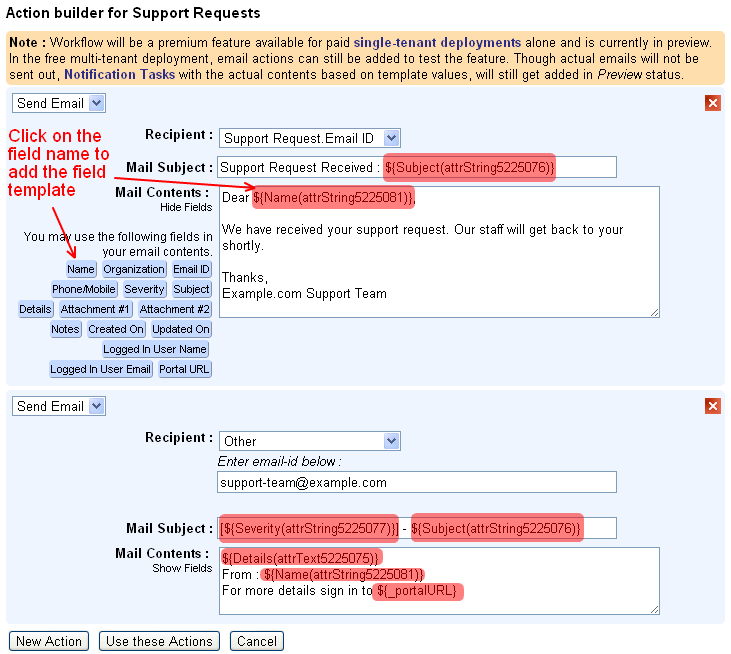
The actions to perform in this example, has an email configured to be sent to the subscribers about the upcoming renewal date, like shown below.

The full work-flow configuration for the sample scheduled workflow is given below, with the relevant sections highlighted in green.
Apart form normal workflow configuration details like Workflow Name, Description, Entity and Status, for the Scheduled Workflow configuration, the Trigger During value needs to be specified as Schedule. The other non-relevant sections of the configuration page can be left with the default values.

Under the Schedule Setting section, we have specified the Schedule Interval to be Every Day, but since we want this to execute only on the 1st of every month, we add a Schedule Criteria Expression as day(now()) == 1 . On the other days, the expression will evaluate to false and will not fetch the records to execute the actions.
The Records To Fetch When Scheduled specifies that only the records which have the Renewal Date in the next month needs to be fetched, for which the specified actions will be executed.
All actions performed during the Scheduled Workflows will be audited under scheduled-workflow-user account.
Scheduled Workflows will be a premium feature available for paid customers. For efficient use of computing resources, the scheduling options will be disabled by default in the paid single-tenant deployments and can be enabled on request.
Hope you find this feature. Feel free to let us know your feedback on how we can enable more such automation for you.
Examples of such scenario can include,
- sending out emails for birthdays,
- sending an SMS when the expiry date is nearing,
- recomputing formula fields of specific records (for example the formula field for Age can be recomputed for records which have Date of Birth on that day).
To enable automation for such scenarios, we have enabled support for Scheduled Workflows.
As a specific example, let us consider a subscriber database which needs to be notified about the upcoming renewal date for their subscription.
The actions to perform in this example, has an email configured to be sent to the subscribers about the upcoming renewal date, like shown below.
The full work-flow configuration for the sample scheduled workflow is given below, with the relevant sections highlighted in green.
Apart form normal workflow configuration details like Workflow Name, Description, Entity and Status, for the Scheduled Workflow configuration, the Trigger During value needs to be specified as Schedule. The other non-relevant sections of the configuration page can be left with the default values.
Under the Schedule Setting section, we have specified the Schedule Interval to be Every Day, but since we want this to execute only on the 1st of every month, we add a Schedule Criteria Expression as day(now()) == 1 . On the other days, the expression will evaluate to false and will not fetch the records to execute the actions.
The Records To Fetch When Scheduled specifies that only the records which have the Renewal Date in the next month needs to be fetched, for which the specified actions will be executed.
All actions performed during the Scheduled Workflows will be audited under scheduled-workflow-user account.
Scheduled Workflows will be a premium feature available for paid customers. For efficient use of computing resources, the scheduling options will be disabled by default in the paid single-tenant deployments and can be enabled on request.
Hope you find this feature. Feel free to let us know your feedback on how we can enable more such automation for you.