Showing posts with label Workflows. Show all posts

Sunday, August 31, 2014

Using Scheduled Workflows for Recurring / Periodic Tasks

While iFreeTools already has support for database-trigger based workflow execution, which can execute tasks like sending out email or SMS, adding of new records or editing existing records in database and for re-indexing records (to recompute formula field values), there can be automation scenarios wherein some workflows need to be triggered periodically, for a specific set of records.

Examples of such scenario can include,

  • sending out emails for birthdays,
  • sending an SMS when the expiry date is nearing,
  • recomputing formula fields of specific records (for example the formula field for Age can be recomputed for records which have Date of Birth on that day).

To enable automation for such scenarios, we have enabled support for Scheduled Workflows.

As a specific example, let us consider a subscriber database which needs to be notified about the upcoming renewal date for their subscription.

The actions to perform in this example, has an email configured to be sent to the subscribers about the upcoming renewal date, like shown below.


The full work-flow configuration for the sample scheduled workflow is given below, with the relevant sections highlighted in green.

Apart form normal workflow configuration details like Workflow Name, Description, Entity and Status, for the Scheduled Workflow configuration, the Trigger During value needs to be specified as Schedule. The other non-relevant sections of the configuration page can be left with the default values.


Under the Schedule Setting section, we have specified the Schedule Interval to be Every Day, but since we want this to execute only on the 1st of every month, we add a Schedule Criteria Expression as day(now()) == 1 . On the other days, the expression will evaluate to false and will not fetch the records to execute the actions.

The Records To Fetch When Scheduled specifies that only the records which have the Renewal Date in the next month needs to be fetched, for which the specified actions will be executed.

All actions performed during the Scheduled Workflows will be audited under scheduled-workflow-user account.

Scheduled Workflows will be a premium feature available for paid customers. For efficient use of computing resources, the scheduling options will be disabled by default in the paid single-tenant deployments and can be enabled on request.

Hope you find this feature. Feel free to let us know your feedback on how we can enable more such automation for you.

Wednesday, October 31, 2012

Twilio integration : Trigger SMS messages from your online database

We are glad to add another premium feature in your favorite online database application for Google App Engine. iFreeTools is now integrated with Twilio to send out SMS messages, triggered as part of workflow actions (database change triggers) or from within the list view (manual trigger).

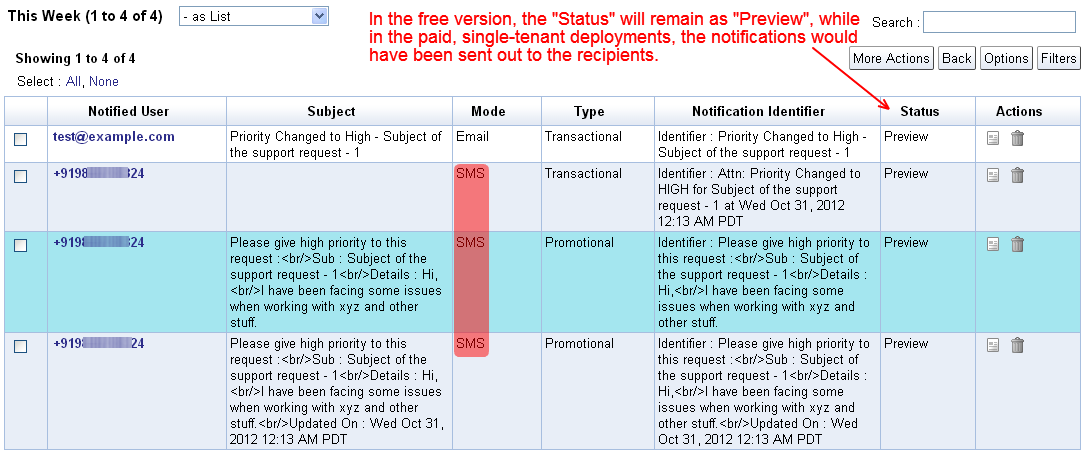
This facility is available as a preview in the free version, where the messages will get added as Notification Tasks with Preview status, while in the paid single-tenant deployment (starts at $99/year), the messages would be sent out to the mobile numbers with the task's status getting marked as Completed.

To make use of this SMS facility, you will have to first configure your App Settings (under Admin), to provide the Account SID and the Auth Token from Twilio, as shown below. If you also have a short-code configured for your use, you can specify the same to be used as the Sender ID, else you can provide your Twilio number (listed under the Numbers tab)


Your Account SID and Auth Token will be available under the dashboard tab on Twilio :
https://www.twilio.com/user/account


For the Sender ID, proceed to the Numbers tab and copy your Twilio number. If in case you have a short-code, you can provide the same in the App Settings in iFreeTools.


The Send SMS option will automatically list all the phone numbers available in the records, which have been marked with Other Rendering as Phone, in the attribute details page.


The option to Send SMS will be available in the list views for records which have a phone number, so that you can select the records and trigger an SMS manually, as shown in the image below..


The resulting page will work similar to how you can send out email-notifications using mail-merge like field values. The Send SMS option will also be available as part of the Workflow actions, so that you can trigger the SMS automatically when the records get added/updated/deleted, as shown below..


You can verify the contents and the status of the messages from under Notification Tasks, which will list all the notifications triggered from the application.


Phone number format (as per Twilio docs) : 

The phone number values need to be in the [+][country code][subscriber number including area code] format to work without issues. Other formats are not guaranteed to work with Twilio, as detailed below..

We strongly encourage E.164 number formatting for all phone numbers both in the ‘to’ and ‘from’ fields. This format is the internationally-standardized format for all phone numbers, and it includes all the relevant information to route calls and SMS messages globally. E.164 numbers can have a maximum of fifteen digits and are usually written as follows: [+][country code][subscriber number including area code]. Phone numbers that are not formatted in E.164 may work, but it depends on the phone or handset that is being used as well as the carrier from which the call or SMS is being originated. 
For example, to convert a US phone number (415 599 2671) to E.164 format, one would need to add the ‘+’ prefix and the country code (which is 1) in front of the number (+1 415 599 2671). In the UK and many other countries internationally, local dialing requires the addition of a 0 in front of the subscriber number. However, to use E.164 formatting, this 0 must be removed. A number such as 020 7183 8750 in the UK would be formatted as +44 20 7183 8750.
Hope you like the new Twilio integration. Keep sending in your feedback and suggestions on how we can make your online database application hosted on Google App Engine work better for you.


Saturday, March 31, 2012

Rule based Email Triggers to Automate Business Processes, using Workflows

Apart from helping build your own online database application, iFreeTools can now help with automating more of your business processes, using workflows. Workflows in iFreeTools can check for criteria-rules during database changes and can trigger actions before or after those database changes.

For the first cut of the workflow implementation, we have enabled sending out emails as part of the workflow actions. More workflow actions like adding / updating records (like creating a task), invoking external web-APIs, etc.,. are to be supported very soon.

Defining and using workflows is as simple as filling in a form.

Let us assume, for example, that you have a custom customer support database application built and hosted using using iFreeTools single-tenant deployment in your own Google App Engine account and that you have a web-form in your website using which support requests can be made.

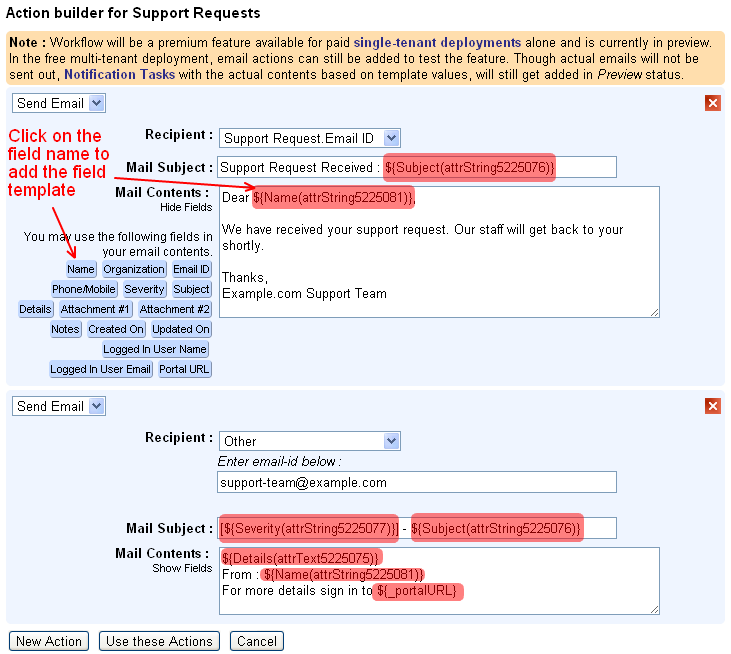
Now, if you wanted to send an automated email to the user's email-id informing that the request has been received and will be processed by your staff soon and to also notify your team of the new support request, then the workflow configuration can be as given below..


Configuring the workflow actions is also very easy, where you can enter the details of the recipient and providing the subject and the contents of the email in the Select Action form. Both subject and contents can have template fields from the database record and will be replaced with actual values when sending out the email.


For this workflow we did not add a workflow rule or the criteria to be matched before the workflow action can be executed. But in case you want to restrict the notifications to only High / Medium severity support requests, you could have done that too. The criteria form  is similar to the Custom Views form and you can specify criteria based on operators is, is not, contains, does not contain.


As can be seen in the messages in the screen-shot images, workflows will be a premium feature available for paid, single-tenant deployments alone, which by the way is very much affordable :

  • $99/year for up to 25 users (which works out to $8.25/month or $0.33/user/month)
  • $198/year for up to 100 users (works out to $16.5/month or $0.165/user/month)
  • $297/year for unlimited users

If you are using the free multi-tenant deployment, you can still try out the feature by creating the workflows and viewing the Notification Tasks records added in Preview status, showing the actual subject and the contents of the email, based on the email-template provided in the workflow configuration.


We will be adding more workflow actions to add / update database records (like creating a task), invoke external web-APIs, etc.,. If you are looking for some specific use-case which you would like to automate using workflows, kindly get in touch with us with details, using the feedback form in the application.