Monday, February 8, 2010

Easy Visualization of Data with Auto-Charts in iFreeTools CRM & Creator

Automatic Chart View options are now available for all views -- pre-defined views, as well as Custom Views -- in our free CRM and app-creator for Google App Engine.

iFreeTools will automatically detect attributes which can be used to group data together and enable auto-charting options for those attributes, as shown below..


This feature is added to our core engine layer and hence available to both iFreeTools CRM and iFreeTools Creator applications. The following screen shot shows charting options in the Property Management application, we had built in our walk-through for iFreeTools Creator..


Current aggregation operation used is count - count of records, grouped by another attribute. We will soon be supporting other options like sum, which will be more useful when we introduce currency data-types.

Go ahead and check out our auto-charting feature available in.. and let us know your feedback.

Friday, January 29, 2010

Build Apps Online, over Google App Engine, using iFreeTools Creator

We are happy to announce the Preview Release of iFreeTools Creator, which was mentioned in our previous post (What's Cooking : iFreeTools "Brahma").

iFreeTools Creator is probably the first Google App Engine based online application builder. It provides users the access to iFreeTools Engine, which powers our Free CRM application.

Let us see how to create a simple Property Management application using iFreeTools Creator..

Configure App Settings

First configure the App Settings under Admin to provide your Organization's name and the applications name. For our example, we will call Acme Inc.'s Property Management.
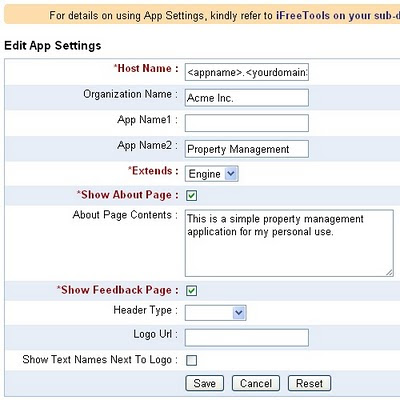


(Other aspects of rebranding are as mentioned in iFreeTools CRM on your sub-domain, with rebranding !!)

Add Required Entities

Now proceed to Entities module under Admin and click on Add Entity. You will get a form to enter the details, as given below. Provide details of Entity and save the record.
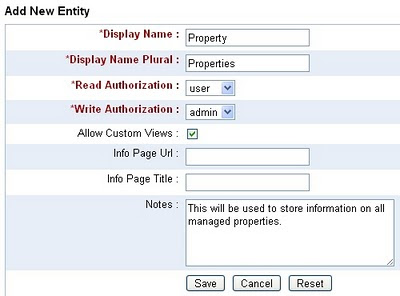

Likewise we will create 3 entities Property, Owner and Tenant. The entities will get listed in the "Custom Entities" view as given below..
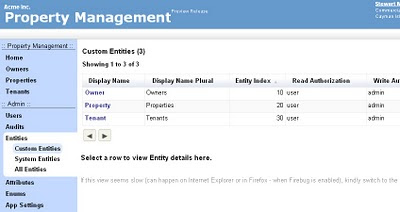

The Entity Index property defines the dependency and listing order.

Add Attributes for Entities

Now you can proceed to add the attributes for those entities. From Admin::Attributes, click on Add Attribute and fill in the form..
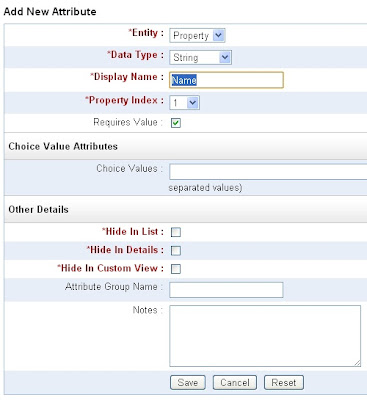

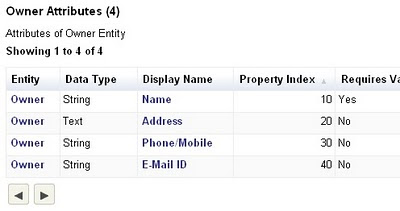
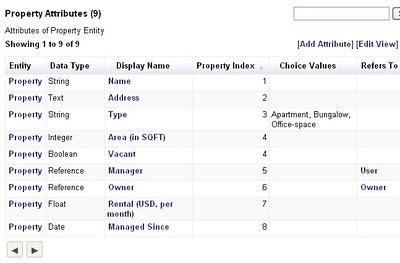
Likewise we can add relevant attributes for all entities. Given below are the attributes we added for the 3 entities...

Owner Attributes


Property Attributes


Tenant Attributes
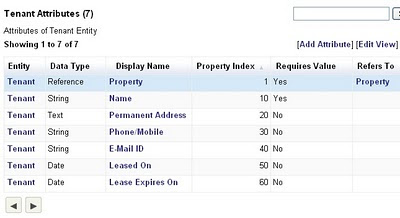


The Property Index decides the order of the attribute items in list, form and details pages.

Start using the application

That is it. You can now start using the Property Management application. The below image shows the "Properties" view with sample data..
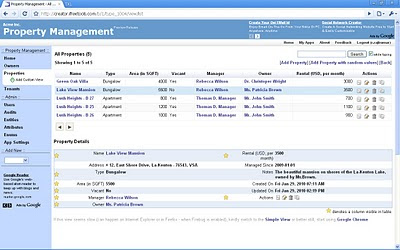

You can always customize it, as and when business needs change. Go ahead, play with the Online Application Creator for Google App Engine.

We do have plans to add more features, including support for more data types, chart views like those available in our CRM application and more. And, we would like to hear your feedback too. You can either use the feedback form in the application or send a mail directly to raj@sahasvat.com.

Related :
Building a simple Bug-tracker application on Google App Engine

Also See :
Custom Actions now supported in Google App Engine powered iFreeTools CRM and Creator


Friday, January 22, 2010

What's Cooking : iFreeTools "Brahma"

Few days ago, I had tweeted about starting work on iFreeTools "Brahma".

For those who were not sure about what that meant, Brahma is believed to be the Hindu god of creation [wikipedia.org].

So it was iFreeTools Creator, the "Online BigTable Database Application Builder", for which work was started. iFreeTools Creator is probably the first Google App Engine based online application builder. It gives users the access to iFreeTools Engine, which powers our Free CRM application.

Below are some screenshots from iFreeTools Creator..

Currently in testing, the following screenshot shows a Custom Entity created for storing information on Real Estate Projects..

The application in the screenshot above uses the default CRM entities, but one might as well start from a clean slate. This feature (custom entities and attributes) will be rolled into the default CRM application as well, at a later date.

So, that is what is cooking at iFreeTools.

I am still working on alternate heading captions for the home page wordings and am also open to changing the image. Feel free to send in your suggestions to raj@sahasvat.com.

Follow @ifreetools in twitter or add this blog [feeds] to your reader, for updates on iFreeTools Creator.

Have a great weekend !!

Wednesday, January 20, 2010

iFreeTools in The 451 Group's report on SaaS M&A

iFreeTools gets a mention in Sector IQ report titled "Buying in the cloud: Where SaaS players and others may look to make M&A moves for apps", by China Martens, dated 14 Jan 2010.

This report is filed under the sectors..
  • Application software / Customer relationship management
  • Application software / Enterprise resource planning


(click to view larger image)

Glad about being part of that report.

Not sure about the exact context or quote, but I think I can guess - based on the title. (Hint: iFreeTools will not acquire any of those companies, listed along with it.)

Tuesday, December 1, 2009

Support for Custom Views in iFreeTools

iFreeTools CRM just got an update with the new Custom Views feature.

Note : Ability to create Custom Views has also be enabled in iFreeTools Creator, our online database app builder for Google Apps. If you do not see this option when viewing the records for your custom entity, kindly verify if you have selected the Allow Custom Views option for that entity.


Clicking on the Add Custom View link available under each module of CRM, will bring up a form wherein one can provide the view name, description and the criteria to be used for filtering.

For example, to view all leads who have not been contacted yet, one can create a "Not Contacted" view as shown below..


Once the view is created, it will be listed along with the predefined views in the module..


One can also provide multiple values for the criteria.

For example, to view all Open Leads by specific owners (say, for users "Gold" and "Diamond"), one can create a view as shown below (notice multiple values in OR for Lead Owner and Lead Status)..


The resulting view will use all values in the criteria to provide the results..


Such Custom Views will be available for use by all users within the application instance, while admin users alone can create/modify/delete Custom Views.

Currently properties with choices and reference properties alone can be used in providing the filter criteria. For other filtering one can use the search within the Advanced Views, for now. We will be coming up with more options for filtering at a later upgrade.

Check out the new feature and feel free to send us your feedback.

Related Blog Posts : 

Monday, November 23, 2009

Instant Search now available in iFreeTools CRM

We told you search was "Coming soon.." when we introduced Advanced Views late last week and now, it has arrived in iFreeTools CRM.

This comes a day after Instant Details and Customizable Columns were added to Advanced Views.

Advanced Views now have a "search as you type" feature, shown in action below..

The search string is matched against values from all the columns in table view. If you want to include a property for the search, just add it as a column of the table and proceed to search.

Advanced Views is Javascript powered and works best in modern browsers like Chrome and Firefox - which we use extensively for our testing. While it does work in IE (it can be a bit slow), we recommend better browsers.

There is also an option to disable "Search while typing", which makes search operations to begin only after clicking on the Search button. This can be useful when using browsers like IE.

Keep sending in your feedback on Google App Engine powered iFreeTools CRM. We listen, and more importantly we act and we deliver - fast.

Instant Details and Customizable Columns now available in Advanced Views

Another upgrade and iFreeTools CRM now has support for Instant Details and Customizable Columns in the Advanced Views. This comes soon after the initial support for Sorting and Faster Paging (Next/Previous), added late last week.

With today's upgrade, Advanced View has been made the default list view. If required, one can always switch back to Simple View and the browser will remember your preference the next time list views are loaded.

Within the Advanced View, one can now view the details of the records instantly by clicking on the row in the table.

When the view loads, you will see something like..


Now click on any row in the table to load the details..


Notice how the visible columns are marked with a star image. You could click on the star (or the property name) to toggle the visibility of the property in the table view.

For example, when you want to remove the Salutation and First Name and instead add Lead Source and Lead Industry, click on the relevant property names in the details view and see the changes getting reflected in the table view..


Once the property becomes a column in the table, it can then be used for sorting. Options to save the view settings either for self or as default settings to all users will be available soon.

The usual details view is still available, where you can also view the lists of related records.

We would be glad to hear from you on what you would like to see in our Google App Engine powered iFreeTools CRM. Check out the features and feel free to send in your feedback.