Friday, October 28, 2011

Export / Import iFreeTools Creator Applications as a single app-file

Creating an online database application using iFreeTools Creator is as easy as defining your entities, attributes and to start using it adding the users. While this allows you to create a basic database app, you can further customize it as per your requirements including by creating custom views, custom actions, authorization profiles, etc.,. And at some point you might want to create a duplication application -- may be for testing new features (which we keep rolling in based on suggestions from users) before you start using them in your main production application instance or may be to move on to your own single-tenant deployment, over your Google App Engine account.

This is easy to an extent, with regard to exporting and importing Custom Entities and All Attributes as CSV files. But, when you would like to have your additional configurations like Custom Views, Custom Actions or fine-grained Auth Profiles which you have created for your users, then the only option until now was to re-create them manually after importing the basic data-model as entities and attributes, as these configurations did not support export / import option.

Not any more. We have now made it possible for admin users to export the application as a single application file which apart from containing the Entities and Attributes details will also have the configuration details of App Settings (including re-branded app-names, logo images, time-zones, etc.,.), Custom Views and Custom Actions (both shared and user-specific), Auth Profiles and Users data.

Technical note : In case you are more technically inclined, the app-file is in JSON format, which you can open with a normal text editor, like notepad and view the contents.

For admin users, the Export App link will be available in the footer.

Once you export this application, save this file to your computer and then proceed to your new application instance. You can create new ones from under My Apps (link in the top-right and in the footer).

In the new application's home page you will find the option to import the app-file under the Import Ready-made Apps tabs.


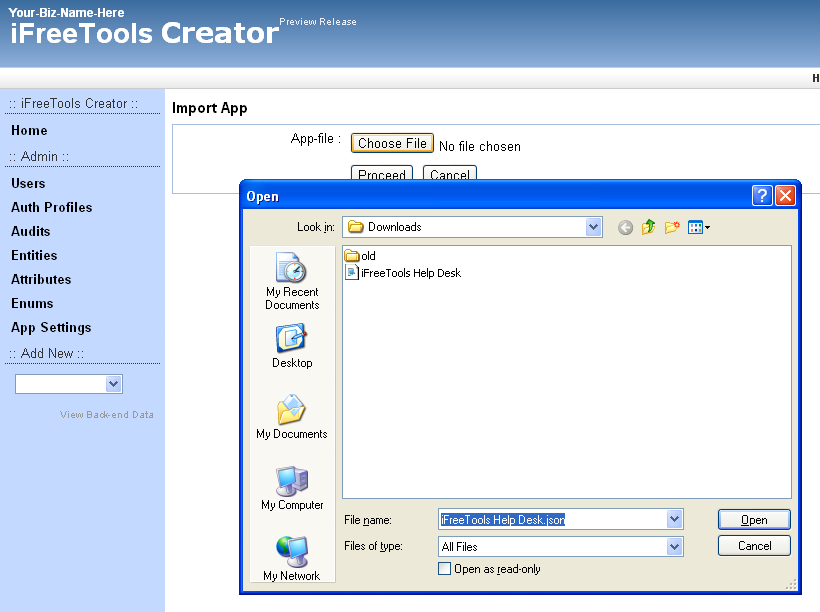
Clicking on the import the app file link will take you to a page where you can specify the app file to be imported.


Browse and select the application file which you had exported earlier and click proceed. iFreeTools Creator will now process the contents of the app-file, to automatically re-create you database application.


That is it ! Now you have a duplication application ready to use. Hope you find the new feature useful. Do keep sending in your suggestions on how we can make your online database application better and easier for you.

Thursday, September 29, 2011

Accessing auto-generated IDs in formula-fields & Enabling keyword-indexing for search

We are happy to announce the availability of two new features which have been requested by many users recently.
  1. Access to auto-generated ID in formula-field expressions
  2. Support for keyword-indexing, enabling better search
Access to auto-generated ID in formula-field expressions.

iFreeTools Creator is built-for and hosted-over Google App Engine. Each record stored within the BigTable datastore of App Engine has its own unique key, which is automatically generated. (Note: This key-id value is not guaranteed to be increasing in sequential-order, but for uniqueness alone).

Until now it was not possible in iFreeTools to make use of this auto-generated key-id in formula fields, as this will not be available when the new record is yet to be saved into the database. But we have now made this possible by allocating the id values and making them available via a new function key_id, detailed below..

key_id 
Usage : key_id(instance=None)
Description : Returns a key-id for the currently added / modified record, if instance parameter is not supplied. If instance parameter is supplied, returns the key-id for the instance.
Example : 
key_id() returns the currently added / updated records key-id 
key_id (val("Customer")) returns the key_id for the Customer field, assuming Customer is a reference attribute.

You can make use of this key_id function in your formula fields to generate a visible unique-id for your data. May be, a issue-id / ticket-id / customer-id / etc.,. like Ticket ID having a formula expression as "TICKET-" + str(key_id()) will generate values of the form TICKET-42322212, assuming you enable keyword-indexing for this field (see below), you can quickly search for this ticket from the full database.

Support for keyword-indexing, enabling better search

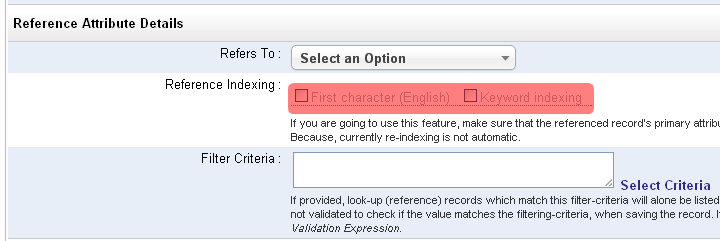
Extending our earlier support for alphabetical-indexing, supported in Single-line text (String) and Lookup (Reference) data-type attributes, we have now added support for indexing the keywords.

This has been added for attributes of Single-line text (String), Multi-line text (Text), List (with String values), Lookup (Reference) and numeric data-types..


When a field is marked for keyword-indexing, iFreeTools will split out the words from the field and store them in a keyword-index, when the record is saved to the database. Later, when searching for records in the list views, apart from the instant-search within the loaded batch, you will be provided with an option to search for the keywords from all records in the database.

While new records will be automatically indexed for the keywords, for older records, you can use the Re-Index All option available under More Actions in the list views.

Hope you like new features. Keep sending in your suggestions on how you believe we can improve your favorite online database app.


Tuesday, August 30, 2011

Now available : Data aggregation in list/chart views, Data-access & Caching functions and more..

Over the month we have rolled-in the following features in your free online database app builder and free online crm, built over Google App Engine for use with Google Apps.
  1. Data aggregation in list views & chart views
  2. Data access and Caching functions
  3. Search for files to attach from Google Docs

Data aggregation in list views & chart views

Numeric attributes (integer and float types) can now have a Default Aggregation configured to display the sum of the fields' values in the list views and in the chart views.

In our iFreeTools CRM, our free CRM app for use with Google Apps, we have enabled this for fields in Expected Revenue, Budgeted Cost and Actual Cost fields in Campaigns and for Amount and Expected Revenue in Opportunities.

The summation of the values from such fields will be listed below the list view as shown in the image below..


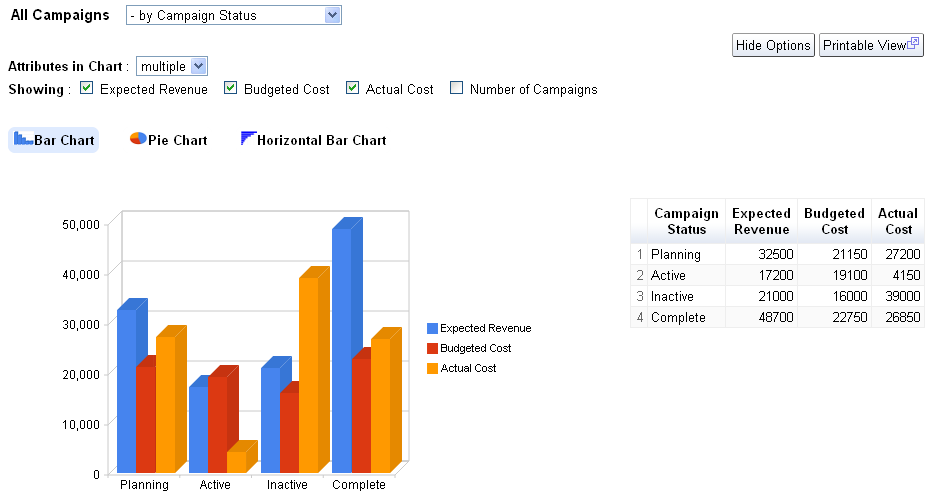
Along with this we have also enabled the result of aggregation from multiple attributes to be rendered in the same graph, so that you can compare related aggregation values visually.

The following image shows the chart views for Campaigns enabled to display values from 3 attributes, Expected Revenue, Budgeted Cost and Actual Cost, grouped by Campaign Status..


For your custom online database apps, built over iFreeTools creator you can specify this configuration in the Attribute form, when you add/edit the attribute details.

Note : All aggregation / charting features are currently restricted to work with smaller batch of data. When our Scheduled Reports feature is available, you can create summary / charts for full set of data.

Data-access and Caching functions

New data-access and caching functions listed below have been now added for use with expressions.

user
Usage : user()
Description : Returns the currently logged in user

fetch_one
Usage : fetch_one(entity_name, criteria)
Description : Returns a record for the given entity_name and filtering criteria
Example : fetch_one("Car", {"Company":"Honda", "Name":"City"}) will fetch a record from the entity having Display Name as Car and for the filtering condition to get the record for Honda City.

val_from
Usage : val_from(instance, prop_name)
Description : Returns a value of a property from the given instance.
Example : val_from(user(), "emailId") will return the current user's email-id, where emailId is the alias for the "Email Id" attribute in User system-entity.

cache
Usage : cache(name, expr)
Description : To cache the result of evaluation of expression expr with the given name.

cached_val
Usage : cached_val(name)
Description : Returns the value which was added to cache previously with the given name.


For more details, refer to Data Access and Cache Functions section the user guide.

Search for files to attach from Google Docs

When attaching files from Google Docs to your records, you now have the option to search for the required file based on text, to narrow down the files and attach the required file to your record.


Hope you like the new features.

Do keep sending in your suggestions on how we can make things better in your free online database app builder.

Friday, July 29, 2011

Date-Time and Error Functions now available for use within Expressions

Your favorite online database app builder tool over Google App Engine - iFreeTools Creator, now supports date-time functions within formula field expressions and in validation expressions.

The new date-time functions made available are listed below :


now
Usage : now ()
Description : Returns a datetime object having the current time.

date
Usage : date(year, month, day)
Description : Returns a date object for the given year, month and day values.

datetime
Usage : datetime (year, month, day, hours=0, minutes=0, seconds=0)
Description : Returns a datetime object for the given parameters. If hours, minutes and seconds are not provided, they will be taken to be 0 (zero).

timedelta
Usage : timedelta (days=0, seconds=0, microseconds=0)
Description : Returns a timedelta object representing a difference in time, for the given days, seconds and microseconds. Can be used to add or subtract date/datetime values.
Example: now() + timedelta(1) will give tomorrow's date and time.


We have also added support for raising error messages when validating values using expressions. Apart from detailing on how to enter the value for the field in the description, this function will enable you to specify the reason for the validation failing.


error
Usage : error(error_msg)
Description : Raises an error with the given error_msg. This will be shown in the form for the corresponding attribute which failed the validation expression.


We have also rolled in a new home page for iFreeTools Creator, now highlighting the important features available in the platform.


Keep sending in your valuable suggestions on how you think we can make iFreeTools better for you.

Wednesday, June 29, 2011

Expressions for Computed Formula Fields & Field Validations, now available in iFreeTools

The labs setup of the Google App Engine powered free online database apps creator, now has support for defining and using expressions for calculated formula fields and in validations.

Update : it is now available at http://creator.ifreetools.com too.

Note : When adding new formula expressions, you will need to re-index the existing records to have the formula value computed for those entries.

Formula Expressions

You can now define expressions based on values in other fields in the database record to compute the value of formula field.

For example, you might have First Name and Last Name as fields within your database record and may prefer to have them combined in another Name field. For this you can add the 3 attributes with data-type as Single line text (String) and for the Name attribute you can set the Formula Expression (under Advanced section of the attributes form) to be

val("First Name") + " " + val("Last Name")

The val function enables you to fetch the value of the field for a given display name.

The formula expressions can be set for any data-types, just make sure the return value of the expression is of the required type.

Aliases for fields

You can also set Aliases for the attributes and use them instead of the val functions, to have the formula to be something like

First_Name+" "+Last_Name

Validation Expressions

You can also define validations expressions which need to evaluate to True for the record to be stored into the database.

So, if you have a product code field and it should always be 5 characters in length, you can set the Validation Expression as

len(inputValue) == 5

For more details on the operators and functions available for use within expressions, kindly refer to Using Expressions for Formula-fields and Validations, in our user guide.


Hope you like the new feature. Do keep sending in your suggestions on how you believe we can make this app better for you.

Monday, May 30, 2011

Yes/No (Boolean) fields support in Custom Views and more

We have been making improvements over the past few weeks to the Free Online Database App Creator for use with Google Apps and in our Free CRM built over Google App Engine, based on feedback/suggestions from our users.

Filter based on Yes / No checkbox (Boolean) fields


We are glad to have rolled in support for Custom Views which can filter records based on Yes / No checkbox (Boolean) fields.

Apart from Yes or a No, you may now also see a --not-set-- value for fields which do not have a value already set for that field. This can happen in iFreeTools Creator, when you add a new Yes / No checkbox (Boolean) attribute to an existing entity which already has records in database. While the new records will have values for this field, the older records will show a --not-set-- value.

The records with --not-set-- value *will not* turn up in the results if the filed is used in the filtering criteria for that Custom View. If you would like it to be available, you can use the bulk-edit to set the values for that field to either Yes or a No.

Customize the order in which the Custom Views are listed


We have also added support customizing the listing order of Custom Views based on View Listing Index value, which you can now provide in the Add/Edit Custom View form. The views will be listed under the module based on this value, in ascending order. That is, views with smaller View Listing Index value will be listed first.

And more..


Apart from these features mentioned above, we have also rolled in a few bug-fixes/improvements, including in the recently added Calendar Views feature.

Do keep sending in your valuable suggestions, on how you think we can make iFreeTools better.

Tuesday, April 5, 2011

What's Cooking : Calendar Views in your Online Database for Google Apps

Yes, support for Calendar Views is what is cooking up at iFreeTools and it is already available in our labs deployment : iFreeTools Labs.

All records which have a date or a date-time field will now have an option to view the records in a Calendar View as shown below..


The calendar view will have options to view the records based on Month, Week or Day. The details view is also loaded via AJAX, as shown below, without you having to leave the calendar view.


The feature will be rolled into your affordable CRM for Google Apps and your favorite custom database app builder for Google Apps, in the coming days.

The current feature uses any one date/date-time field, at a time, for the Calendar View. We will be coming up with an option to specify start & end fields too, so that you can have the events span across hours and days too. And together with that you will have an option to export the data to Google Calendar in iCal format.

Hope you like the new feature. Do keep sending in your valuable suggestions.