Friday, September 28, 2018

New mobile optimized user-interface for iFreeTools Creator

We are glad to roll in a new version of iFreeTools Creator with mobile optimized responsive user-interface.

Our new home page on desktop / laptops:


Our home page on mobile devices:

Free Online Database App - Home page on android mobile


Database record details page on mobile devices:


Database record add/edit form on mobile devices:


Feel free to share your feedback on the new user interface and we will refine this version further based on the same.

You can still switch to the old version using the link in the footer.

We are also been rolling out this new version to our paid single-tenant deployment customers and the process will be completed in a few more days. If you are a paid customer who has not yet received the upgrade and would like to try this out sooner, just send us an email and we will fast track the upgrade for you.

Looking to leverage the Google Cloud always free quotas? Get yourself/your-organization a single-tenant deployment of iFreeTools Creator, for an exclusive virtual private cloud hosting of your online database application. 

Sunday, August 31, 2014

Using Scheduled Workflows for Recurring / Periodic Tasks

While iFreeTools already has support for database-trigger based workflow execution, which can execute tasks like sending out email or SMS, adding of new records or editing existing records in database and for re-indexing records (to recompute formula field values), there can be automation scenarios wherein some workflows need to be triggered periodically, for a specific set of records.

Examples of such scenario can include,

  • sending out emails for birthdays,
  • sending an SMS when the expiry date is nearing,
  • recomputing formula fields of specific records (for example the formula field for Age can be recomputed for records which have Date of Birth on that day).

To enable automation for such scenarios, we have enabled support for Scheduled Workflows.

As a specific example, let us consider a subscriber database which needs to be notified about the upcoming renewal date for their subscription.

The actions to perform in this example, has an email configured to be sent to the subscribers about the upcoming renewal date, like shown below.


The full work-flow configuration for the sample scheduled workflow is given below, with the relevant sections highlighted in green.

Apart form normal workflow configuration details like Workflow NameDescriptionEntity and Status, for the Scheduled Workflow configuration, the Trigger During value needs to be specified as Schedule. The other non-relevant sections of the configuration page can be left with the default values.


Under the Schedule Setting section, we have specified the Schedule Interval to be Every Day, but since we want this to execute only on the 1st of every month, we add a Schedule Criteria Expression as day(now()) == 1 . On the other days, the expression will evaluate to false and will not fetch the records to execute the actions.

The Records To Fetch When Scheduled specifies that only the records which have the Renewal Date in the next month needs to be fetched, for which the specified actions will be executed.

All actions performed during the Scheduled Workflows will be audited under scheduled-workflow-user account.

Scheduled Workflows will be a premium feature available for paid customers. For efficient use of computing resources, the scheduling options will be disabled by default in the paid single-tenant deployments and can be enabled on request.

Hope you find this feature. Feel free to let us know your feedback on how we can enable more such automation for you.

Thursday, July 31, 2014

Enabling "Import" and "Unlock any record" permissions for non-admin users

Until now, we had restricted the ability to import data (as CSV files) and the ability to being able to unlock any of the locked records, to admin users alone. Due to the nature of these operations, we believed that  such a restriction would be necessary.

Some customers wanted to enable these permissions to trusted users, but at the same time did not want to provide full admin permissions, considering those users to be in an intermediate permission level. Based on their requests, we have now made it possible to enable non-admin users to import data and to be able to unlock any records using Auth Profiles.

While Import permission will be configurable for all entities in the Auth Profile form, the Unlock any record permission will be available for configuration only for entities which have record locking enabled.


Hope you find the new features useful. Feel free to let us know your feedback on how we can make things better for you in your online database application creator

Monday, June 30, 2014

Upload files of size up to 32 MB, in your online database

iFreeTools Creator, your online database application builder built for hosting on Google App Engine, has had support for image fields since the early days. These image fields used Google App Engine's datastore to store the files. Due to the design of the App Engine datastore, the maximum file size for these fields was limited to 1 MB. We had an automatic size-reduction enabled for these fields, to reduce the file sizes of the uploaded files. This field has been serving our free-users and our paid-customers well until now.

For bigger files, there was always the option of storing them within Google Drive and attaching the files from Google Drive to database records. But these attachments are treated different from the normal fields. So, some clients have been requesting support for bigger file uploads.

Based on a prioritization request from our client, we have now enabled support for bigger file uploads for our paid single-tenant deployment customers.

Paid deployments will now have an option to add new attributes with Image / File Upload (Big) data-type.


These new attributes will store the file contents in Google App Engine's blobstore. The blobstore allows files of sizes up to 32 MB to be uploaded, utilizing the 5 GB free blobstore quota, offered by Google for all Google App Engine applications.

Additional storage will be billed at $0.026/GB/month (payable to Google) :
https://developers.google.com/appengine/pricing#Billable_Resource_Unit_Costs

We have started rolling in this feature for our paid customers. If you are a paid customer of iFreeTools, you should see this feature available in your deployment very soon.

Do you have a feature request for iFreeTools that you want to be prioritized? Get in touch with us, so that we take this forward.

Tuesday, May 27, 2014

Attach files or folders from Google Drive to your database records

Following our recent back-end changes in iFreeTools, we are now glad to enhance our Google Docs attachment feature, to now support attaching any files/folder from within Google Drive.

Earlier, it was possible to attach limited file types alone from Google Docs (document, spreadsheet, presentation and PDF), like shown below :


With the recent upgrade and subsequent changes, we have moved to using latest version of Google services and have integrated with Google Drive API.

This has enabled us to allow attaching any of the files or folders from within Google Drive, including Microsoft file formats, Google drawings, standard images files and zip files.


The attached files or folders will get listed under the database record's details page.

Like in the earlier implementation, the attachment process does not duplicate the file contents, but creates an association with the database record within iFreeTools, so that you can access the latest version from within the record's details page. The sharing permissions configured for the file/folder in Google Drive will hence remain enforced.


Hope you like the new feature. Feel free to send in your feedback on how you think we can make things better for you in iFreeTools.

Wednesday, April 9, 2014

Back-end changes in iFreeTools

We have recently invested in migrating iFreeTools code to the latest computing environment on Google App Engine. As a result of these changes, iFreeTools is now able to utilize computing resources in a better way, than it was possible earlier.

The new version having these changes has already been rolled out in our free multi-tenant deployment, hosted at http://creator.ifreetools.com and we are in the progress of rolling this version for all single-tenant deployment customers.

What these back-end changes will mean for you :

If you are a user of the free multi-tenant deployment, you will be glad that we can serve more of the growing number of free applications. You may have also already experienced lesser latency than earlier, in the recent days.

If you are paid customer, using our single-tenant deployment option, you will be able serve more users with lower computing instance hours. This is now possible because each computing instance can handle more than one request at the same time (multi-threaded processing).

These back-end changes also enable other possibilities and new features, including some features which have been oft requested by our users. 

Keep following our blogs for more details on these new features.

Saturday, November 30, 2013

Assigning colors to database records, for use in Calender views

We have now enabled an option to show entries in calendar view with configurable background and text colors in your favorite online database builder.

To use this feature, you need to add 2 new attributes and provide them with aliases as backgroundColor and textColor. You can assign the colors directly in forms (selecting from a list of choice-values) or you can assign them automatically using formula.

When the calendar views are displayed, iFreeTools will check to see if there is an attribute with alias as backgroundColor and textColor within the record, and if so, it will use those attribute's values for the calendar rendering.

As an example, let us consider a database of issues, reported by customers. If the issue records had a Severity attribute, which can take values as Critical, Major, Minor, and Cosmetic and if we wanted to view the entries in the calendar, such that the background color is based on this Severity, using the following colors for those severity values :

Severity : CriticalMajorMinorCosmetic

Then, we can add formula attributes to set the required color values for the records, so that they are used in the calendar view. Our sample app to showcase this new feature will similar to the issue tracker application we had built in one of the earlier walk-through, with the following attributes :
  • Title attribute as Single-line Text.
  • Description attribute as Multi-line Text.
  • Steps to reproduce attribute as Multi-line Text.
  • Severity attribute as Multi-line Text with choice values Critical, Major, Minor, Cosmetic & alias as severity.
  • Background Color attribute as Single-line Text with alias as backgroundColor & formula expression as :
    switch(severity == "Critical", "red", severity == "Major","orange", severity == "Minor", "yellow", severity == "Cosmetic", "lightblue").
  • Text Color attribute as Single-line Text with alias as textColor & formula expression as :
    iif(severity == "Critical", "white", "black").
  • Status attribute as Single-line Text with choice value as New, Accepted, Closed & alias as status.
  • Tester attribute as Lookup field (Reference), with Refers To as User.
  • Date Logged attribute as Date with formula expression as :
     iif(dateLogged, dateLogged, today()).
  • Date Closed attribute as Date with formula expression as :
     iif(status == "Closed", iif(dateClosed, dateClosed, today()), None).
Now assuming we also wanted to mark the closed issue as green, the formula for Background Color can be changed to be similar to the one given below :

iif(status == "Closed", "green", switch(severity == "Critical", "red", severity == "Major", "orange", severity == "Minor", "yellow", severity == "Cosmetic", "lightblue"))

The configuration of the Attributes is given below for reference:


We can now proceed to add entries into the issue records and they would get assigned with background and text colors based on the formula expressions we have specified.

The following image shows the calender view with some sample entries having the configured background and text colors.


Existing entries will have to be re-indexed once (from under More Actions > Re-index, in the list views) to have the formula attributes updated.

Hope you like the new feature. Feel free to let us know your feedback and suggestions.

Tuesday, October 29, 2013

Specifying default values for form fields, using expressions

iFreeTools Creator, your easy web-based database software built for hosting on Google App Engine, now supports specifying default values for attributes in forms. The default values can be configured using the Default Value Expression in Attribute definition.


Expressions should return the result in the expected data-type. For details on using expressions, you may refer to our help docs.

Sample default value expression for each data type are given below:

Data Type

Examples

Single/Multi-line Text

  • "Velachery"
    Text values have to be provided within quotes.
  • val_from(user(), "Name")
    to set the currently logged-in user's name.
  • val_from(user(), "Email Id")
    to set the currently logged-in user's email-id.
Yes/No checkbox (Boolean)


  • True
  • False
  • val_from(user(),"Role") == "admin" to mark as Yes, if the current user has admin access.
Number Integer/Decimal numbers
  • 1
  • -2
  • 33.5
  • -44.75
  • val_from(fetch_one("Fee Details", "Year":year(), "Month":month()}), "Fees"))
    to fetch the values form an existing database record, in this case, from Fee Details entity, which matches the condition of having the Year attribute as the current year and the Month attribue as current month. From this matching record, we get the default-value from the Fees attribute.
Single line text - Choice Value

  • "Cash"
    Any of the choice values can be provided. For example, the above is valid if the choice values were : "Cheque", "Cash", "Bank Transfer"
Date
  • today()
  • today() + timedelta(5)
    to set the date value as 5 days from the current date.
Date and Time
  • now()
  • now() + timedelta(0,3600*10)
    to set the date-time value as 10 hours from the current date-time.
Image
  • key_id(val_from(fetch_one("Default Values",{}), "Default Profile Image"))
    to fetch the image form an existing database record, in this case, from Default Values entity, having an image-attribute with name as Default Profile Image.
Geographical Location (Geo Point)
  • "13.1207829,80.2377078" 
    in case you know the co-ordinates of a specific location, the value has to be provided within quotes.
  • val_from(fetch_one("Default Values",{}), "Default Location") 
    to fetch the location form an existing database record, in this case, from Default Values entity, having an geo-point-attribute with name as Default Location.
List (with string values)
  • ["English", "Spanish", "French"]
  • val_from(fetch_one("Default Values",{}), "Default Languages")
    to fetch the values from an existing database record, in this case, from Default Values entity, having an list-attribute with name as Default Languages.
Lookup field (Reference)
  • key_id(fetch_one("Teacher",{"Name":"John Smith"}))
    to fetch the values from an existing database record, in this case, from the Teacher entity, having Name as John Smith.

Hope you like our new feature. If you need assistance in using this feature or if you have suggestions, feel free to use the feedback form in our application.

Sunday, June 30, 2013

What's Cooking : Internationalization & Localization support

We are glad to share the news that iFreeTools will soon be supporting internationalization and localization.

Once available, you will be able to select the language in the App Settings and the application will be rendered using the selected language.

For the first cut, we are enabling support for Tamil, a south-Indian language, which we have been using in our testing. The image below shows the Add Attribute form in Tamil.


You will be able to try the Tamil language in our Labs set up currently and the changes which will make it into the other deployments very soon.

Help translate iFreeTools and get a $90 discount* on your single-tenant deployment!

If your language is not already supported in iFreeTools Creator and if you are interested in helping us support the same, feel free to get in touch with us for the language mapping file. Once the translation is completed and imported into your single-tenant deployment, you should be able to have the application in your language.

Update : 


Spanish language support : 

Our effort to support multiple-languages was triggered by Ms.Belén Lara's detailed blog post on iFreeTools Creator, which is equivalent to a quick-start guide in Spanish : ...crear una Base de Datos on-line. iFreeTools.

After we added support for multiple languages, she has also provided the Spanish translation for the application. Coming from a technologically savvy database user, we believe her translations should work out well for the Spanish users of our application.

Thank you, Ms.Belén Lara!

Italian language support : 

We have rolled-in Italian language support in iFreeTools Creator, thanks to the efforts of Mr.Adriano Caresani. If you are looking to build your online database application and would like hire an Italian-speaking consultant, you should get in touch with Adriano.

Thank you, Adriano!


*Terms and conditions, for this offer :
  • The compensation for the translation mapping file, which will become a property of iFreeTools, will be provided in the form of discount to subscription fees alone.
  • This discount is applicable for one paid, single-tenant deployment and towards the first year subscription fee alone.
  • Even if the language mapping is already available with us, translation to popular country-specific dialects may still be eligible for a $45 discount.
The terms and conditions of this offer can be refined / altered / the offer itself might be withdrawn at any time. You are requested to kindly get in touch with us using the feedback form, to know if you can avail this offer.

Sunday, December 16, 2012

Enabling fine-grained Public Access to your Online Database

A lot of our users have been requesting an option to enable publishing of selected subset of data from their online database application, which they have hosted on their Google App Engine account and mapped to their Google Apps domain.

This may be for use-cases like sharing the knowledge-base section from the online database application or may be, to allow users to view a directory of some sort, without having to ask them to login into the application, using their Google / Yahoo! / Google Apps user account.

We have now enabled this public-access facility as a premium feature in iFreeTools, available for paid single-tenant deployments. Preview of the feature is also made available in the free multi-tenant deployment at http://creator.ifreetools.com, which will work like in the paid deployment, except that it will list limited data, so that you can try out the feature before you sign-up for the paid deployment.

To enable public access to your database, you will have to :
  1. Define a new Auth Profile with permissions set for the View operation and select the fields which you would like to make visible for public access. Other permissions set for Add / Edit / Delete / etc.,. will be ignored, when this auth-profile is used in the context of public-access.
  2. Add a new user with email-id as public-read-only-user@ifreetools.com, associating the auth-profile
That is it!

You can now access the application by tweaking your URL to use a /x/ instead of /b/. That is, if the direct link to your application instance is..
http://creator.ifreetools.com/b/12341234

then, the public access for this web-application will be available at..
http://creator.ifreetools.com/x/12341234

All "write" operations (Add / Edit / Delete) are disabled for the public-access. Your users can still use the embed-able public web-forms, to enable adding new records into the database.

All the public access pages will be marked with a noindex and nofollow meta-tag, so the contents would not be indexed by crawlers which follow this meta directive. This meta-tag can be removed on request, in paid single-tenant deployments.

Hope you like this new feature. Feel free to use the feedback form in the application and let us know how we can help you meet more of your business use-cases with iFreeTools.

Wednesday, October 31, 2012

Twilio integration : Trigger SMS messages from your online database

We are glad to add another premium feature in your favorite online database application for Google App Engine. iFreeTools is now integrated with Twilio to send out SMS messages, triggered as part of workflow actions (database change triggers) or from within the list view (manual trigger).

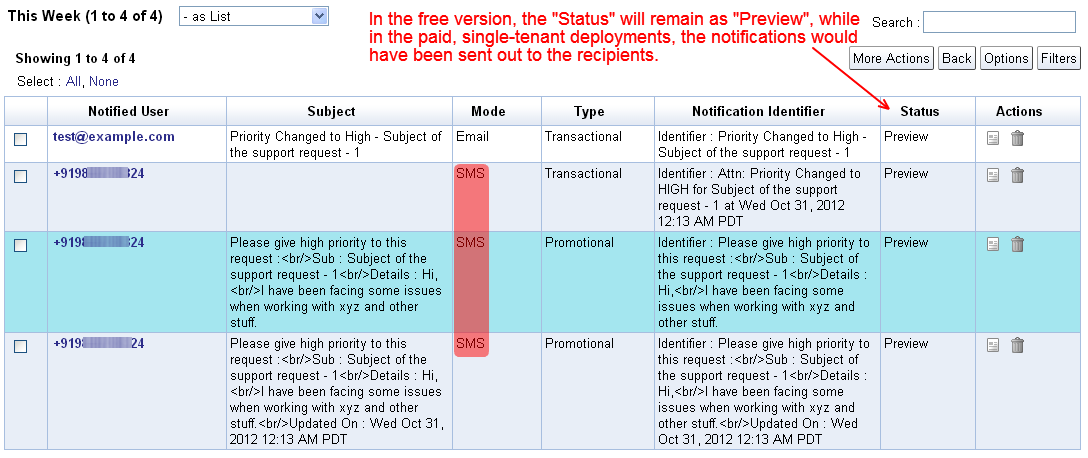
This facility is available as a preview in the free version, where the messages will get added as Notification Tasks with Preview status, while in the paid single-tenant deployment (starts at $99/year), the messages would be sent out to the mobile numbers with the task's status getting marked as Completed.

To make use of this SMS facility, you will have to first configure your App Settings (under Admin), to provide the Account SID and the Auth Token from Twilio, as shown below. If you also have a short-code configured for your use, you can specify the same to be used as the Sender ID, else you can provide your Twilio number (listed under the Numbers tab)


Your Account SID and Auth Token will be available under the dashboard tab on Twilio :
https://www.twilio.com/user/account


For the Sender ID, proceed to the Numbers tab and copy your Twilio number. If in case you have a short-code, you can provide the same in the App Settings in iFreeTools.


The Send SMS option will automatically list all the phone numbers available in the records, which have been marked with Other Rendering as Phone, in the attribute details page.


The option to Send SMS will be available in the list views for records which have a phone number, so that you can select the records and trigger an SMS manually, as shown in the image below..


The resulting page will work similar to how you can send out email-notifications using mail-merge like field values. The Send SMS option will also be available as part of the Workflow actions, so that you can trigger the SMS automatically when the records get added/updated/deleted, as shown below..


You can verify the contents and the status of the messages from under Notification Tasks, which will list all the notifications triggered from the application.


Phone number format (as per Twilio docs)

The phone number values need to be in the [+][country code][subscriber number including area code] format to work without issues. Other formats are not guaranteed to work with Twilio, as detailed below..

We strongly encourage E.164 number formatting for all phone numbers both in the ‘to’ and ‘from’ fields. This format is the internationally-standardized format for all phone numbers, and it includes all the relevant information to route calls and SMS messages globally. E.164 numbers can have a maximum of fifteen digits and are usually written as follows: [+][country code][subscriber number including area code]. Phone numbers that are not formatted in E.164 may work, but it depends on the phone or handset that is being used as well as the carrier from which the call or SMS is being originated. 
For example, to convert a US phone number (415 599 2671) to E.164 format, one would need to add the ‘+’ prefix and the country code (which is 1) in front of the number (+1 415 599 2671). In the UK and many other countries internationally, local dialing requires the addition of a 0 in front of the subscriber number. However, to use E.164 formatting, this 0 must be removed. A number such as 020 7183 8750 in the UK would be formatted as +44 20 7183 8750.
Hope you like the new Twilio integration. Keep sending in your feedback and suggestions on how we can make your online database application hosted on Google App Engine work better for you.


Sunday, September 2, 2012

Enable Record-Locking to allow users to Lock / Unlock database records

We have now added a new feature in your custom online database application creator to enable record-locking facility for your online database records. In the Add / Edit Entity form, you will now find an option to enable record-locking for that specific entity's records, as shown below.


Once you check on the Enable Record Locking option and save the entity, you will now see options in the list view and in the details view to lock / unlock / request-unlock of database records. These options will be made available only for those users who have edit permissions to the record.

The following image shows all the database records in unlocked state, with a button under Actions to have them locked.


When the records get locked, the action buttons would change to reflect their locked status. You can also get to know who has currently locked a record from the Locked By attribute, as shown below.


When another user who also has edit permissions to the same record accesses the list view, the user will get to see the locked status. They will not find the option to edit / delete the locked records. They can request for the record to be unlocked. This will trigger an email to the user who has currently locked the record, in case of paid single-tenant deployments, while notification tasks will get added in the free version with Preview status.


Admin users can unlock records locked by any other users, if such a need arises. All locking / unlocking operations are automatically audited and will be available under Admin > Audits.

Record-locking is a premium feature available as a preview in the free version, wherein you can enable this facility for one entity (record type). If you are a paid single-tenant deployments customer, you can enable record-locking for any number of entities.

Hope you like the new feature. Feel free to get in touch with your feedback and suggestions for improving iFreeTools, to help meet more of your business requirements.

Saturday, March 31, 2012

Rule based Email Triggers to Automate Business Processes, using Workflows

Apart from helping build your own online database application, iFreeTools can now help with automating more of your business processes, using workflows. Workflows in iFreeTools can check for criteria-rules during database changes and can trigger actions before or after those database changes.

For the first cut of the workflow implementation, we have enabled sending out emails as part of the workflow actions. More workflow actions like adding / updating records (like creating a task), invoking external web-APIs, etc.,. are to be supported very soon.

Defining and using workflows is as simple as filling in a form.

Let us assume, for example, that you have a custom customer support database application built and hosted using using iFreeTools single-tenant deployment in your own Google App Engine account and that you have a web-form in your website using which support requests can be made.

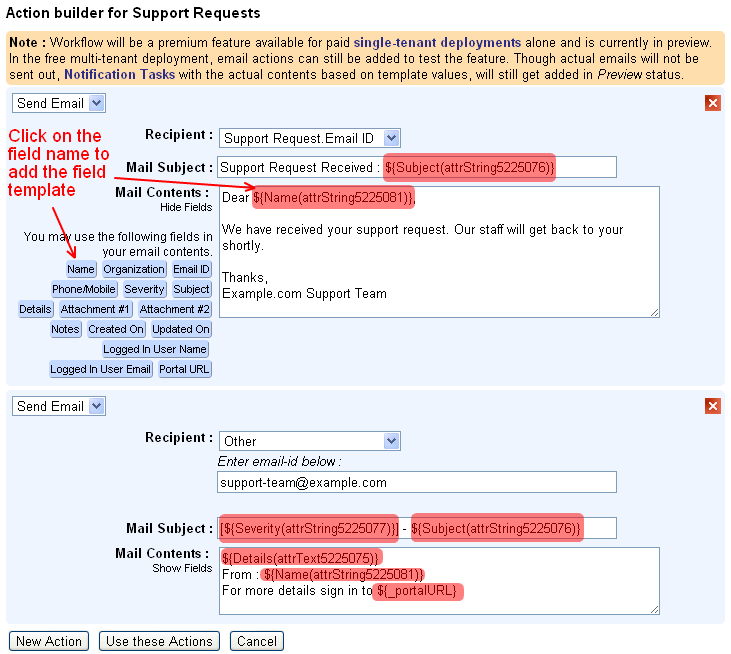
Now, if you wanted to send an automated email to the user's email-id informing that the request has been received and will be processed by your staff soon and to also notify your team of the new support request, then the workflow configuration can be as given below..


Configuring the workflow actions is also very easy, where you can enter the details of the recipient and providing the subject and the contents of the email in the Select Action form. Both subject and contents can have template fields from the database record and will be replaced with actual values when sending out the email.


For this workflow we did not add a workflow rule or the criteria to be matched before the workflow action can be executed. But in case you want to restrict the notifications to only High / Medium severity support requests, you could have done that too. The criteria form  is similar to the Custom Views form and you can specify criteria based on operators is, is not, contains, does not contain.


As can be seen in the messages in the screen-shot images, workflows will be a premium feature available for paid, single-tenant deployments alone, which by the way is very much affordable :

  • $99/year for up to 25 users (which works out to $8.25/month or $0.33/user/month)
  • $198/year for up to 100 users (works out to $16.5/month or $0.165/user/month)
  • $297/year for unlimited users

If you are using the free multi-tenant deployment, you can still try out the feature by creating the workflows and viewing the Notification Tasks records added in Preview status, showing the actual subject and the contents of the email, based on the email-template provided in the workflow configuration.


We will be adding more workflow actions to add / update database records (like creating a task), invoke external web-APIs, etc.,. If you are looking for some specific use-case which you would like to automate using workflows, kindly get in touch with us with details, using the feedback form in the application.


Tuesday, February 21, 2012

Create Free Online Web Forms to Embed in your Website

iFreeTools Creator - your custom online database application builder, built for and hosted over Google App Engine - now supports free online web-forms, which you can link-to or embed directly in your websites. When the data is filled-in and submitted using the online forms, the data will get added directly into your iFreeTools Creator online database application, which you (and your authorized users) can sign in to access.

As part of the Entity configuration, you can now specify if you would like to enable web-forms for that entity, as highlighted in the image below.


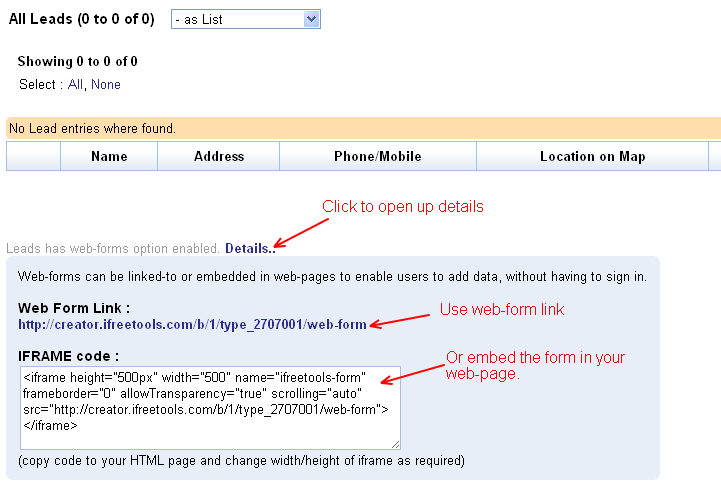
Once the online web-forms are enabled, you can get the link for the web-form and the IFRAME code in the entity's list views. You can either provide the link to the public web-form in your website / blog or you can embed the form using the IFRAME code, directly within your website.


The link / embed-code will open up the online form, for your users to enter the details. Sample public web-form accessed via the link is shown below.


Currently, as part of the free plan, you can enable web-forms for just one entity, while with paid deployments you can enable public web-forms for unlimited number of entities.

Update : It is also possible to restrict the fields in the web-form, using authorization profiles. For this you will have to..
  1. Define a new Auth Profile with permissions set for the Add operation and select the required fields. Other permissions like View / Edit / Delete / etc.,. will be ignored, when this auth-profile is used in the context of web-form.
  2. Add a new user with email-id as public-web-form-user@ifreetools.com, associating the auth-profile
Please note that having such an user-account configured will affect all the public web-forms.

Hope you find the public web-forms support useful in your database application.

Tuesday, November 29, 2011

Quick filters now available in iFreeTools

Your favorite web-based database app builder and your CRM for use with Google Apps, have long supported ways to filter records based on custom filtering criteria, using the Custom Views feature.

While creating Custom Views is convenient for oft-searched filtering criteria, there are times when you might prefer a quick way to get a sub-set of your database records, without having to create a view first.

Based on your requests from users, we have now added support for such quick filtering. In the list view, you will now find the quick filtering options under Filters.

iFreeTools will automatically provide the quick-filters for boolean (yes/no) fields, date fields, date-time fields and for fields which have choice-values (either drop-down or multi-select fields), as shown in the sample view below.


Date and Date-time fields will have both the year and month filtering options.

Access control rules for the fields, if any, will be confirmed-to, when showing the quick-filters. That is, users will see the automatic quick-filters for the supported field types, only if they have the viewing permission for those fields.

Apart from these quick filtering options, users can also use the alphabetical indexing, keyword-indexing and the client-side instant search to narrow down the records from the database.

Hope you like the new feature. Keep sending in your suggestions.

Friday, October 28, 2011

Export / Import iFreeTools Creator Applications as a single app-file

Creating an online database application using iFreeTools Creator is as easy as defining your entities, attributes and to start using it adding the users. While this allows you to create a basic database app, you can further customize it as per your requirements including by creating custom views, custom actions, authorization profiles, etc.,. And at some point you might want to create a duplication application -- may be for testing new features (which we keep rolling in based on suggestions from users) before you start using them in your main production application instance or may be to move on to your own single-tenant deployment, over your Google App Engine account.

This is easy to an extent, with regard to exporting and importing Custom Entities and All Attributes as CSV files. But, when you would like to have your additional configurations like Custom Views, Custom Actions or fine-grained Auth Profiles which you have created for your users, then the only option until now was to re-create them manually after importing the basic data-model as entities and attributes, as these configurations did not support export / import option.

Not any more. We have now made it possible for admin users to export the application as a single application file which apart from containing the Entities and Attributes details will also have the configuration details of App Settings (including re-branded app-names, logo images, time-zones, etc.,.), Custom Views and Custom Actions (both shared and user-specific), Auth Profiles and Users data.

Technical note : In case you are more technically inclined, the app-file is in JSON format, which you can open with a normal text editor, like notepad and view the contents.

For admin users, the Export App link will be available in the footer.

Once you export this application, save this file to your computer and then proceed to your new application instance. You can create new ones from under My Apps (link in the top-right and in the footer).

In the new application's home page you will find the option to import the app-file under the Import Ready-made Apps tabs.


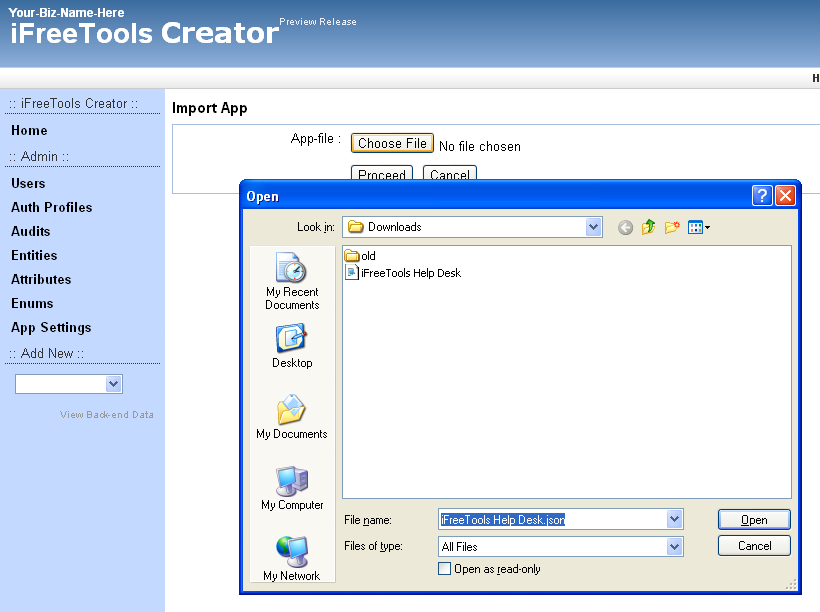
Clicking on the import the app file link will take you to a page where you can specify the app file to be imported.


Browse and select the application file which you had exported earlier and click proceed. iFreeTools Creator will now process the contents of the app-file, to automatically re-create you database application.


That is it ! Now you have a duplication application ready to use. Hope you find the new feature useful. Do keep sending in your suggestions on how we can make your online database application better and easier for you.

Thursday, September 29, 2011

Accessing auto-generated IDs in formula-fields & Enabling keyword-indexing for search

We are happy to announce the availability of two new features which have been requested by many users recently.
  1. Access to auto-generated ID in formula-field expressions
  2. Support for keyword-indexing, enabling better search
Access to auto-generated ID in formula-field expressions.

iFreeTools Creator is built-for and hosted-over Google App Engine. Each record stored within the BigTable datastore of App Engine has its own unique key, which is automatically generated. (Note: This key-id value is not guaranteed to be increasing in sequential-order, but for uniqueness alone).

Until now it was not possible in iFreeTools to make use of this auto-generated key-id in formula fields, as this will not be available when the new record is yet to be saved into the database. But we have now made this possible by allocating the id values and making them available via a new function key_id, detailed below..

key_id 
Usage : key_id(instance=None)
Description : Returns a key-id for the currently added / modified record, if instance parameter is not supplied. If instance parameter is supplied, returns the key-id for the instance.
Example : 
key_id() returns the currently added / updated records key-id 
key_id (val("Customer")) returns the key_id for the Customer field, assuming Customer is a reference attribute.

You can make use of this key_id function in your formula fields to generate a visible unique-id for your data. May be, a issue-id / ticket-id / customer-id / etc.,. like Ticket ID having a formula expression as "TICKET-" + str(key_id()) will generate values of the form TICKET-42322212, assuming you enable keyword-indexing for this field (see below), you can quickly search for this ticket from the full database.

Support for keyword-indexing, enabling better search

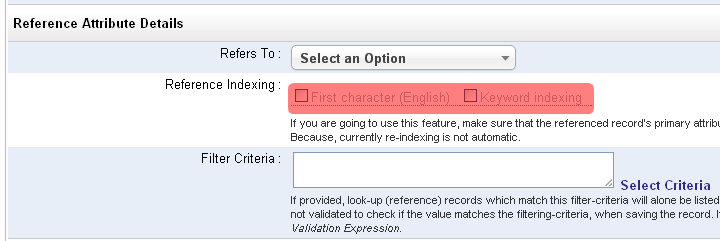
Extending our earlier support for alphabetical-indexing, supported in Single-line text (String) and Lookup (Reference) data-type attributes, we have now added support for indexing the keywords.

This has been added for attributes of Single-line text (String), Multi-line text (Text), List (with String values), Lookup (Reference) and numeric data-types..


When a field is marked for keyword-indexing, iFreeTools will split out the words from the field and store them in a keyword-index, when the record is saved to the database. Later, when searching for records in the list views, apart from the instant-search within the loaded batch, you will be provided with an option to search for the keywords from all records in the database.

While new records will be automatically indexed for the keywords, for older records, you can use the Re-Index All option available under More Actions in the list views.

Hope you like new features. Keep sending in your suggestions on how you believe we can improve your favorite online database app.


Tuesday, August 30, 2011

Now available : Data aggregation in list/chart views, Data-access & Caching functions and more..

Over the month we have rolled-in the following features in your free online database app builder and free online crm, built over Google App Engine for use with Google Apps.
  1. Data aggregation in list views & chart views
  2. Data access and Caching functions
  3. Search for files to attach from Google Docs

Data aggregation in list views & chart views

Numeric attributes (integer and float types) can now have a Default Aggregation configured to display the sum of the fields' values in the list views and in the chart views.

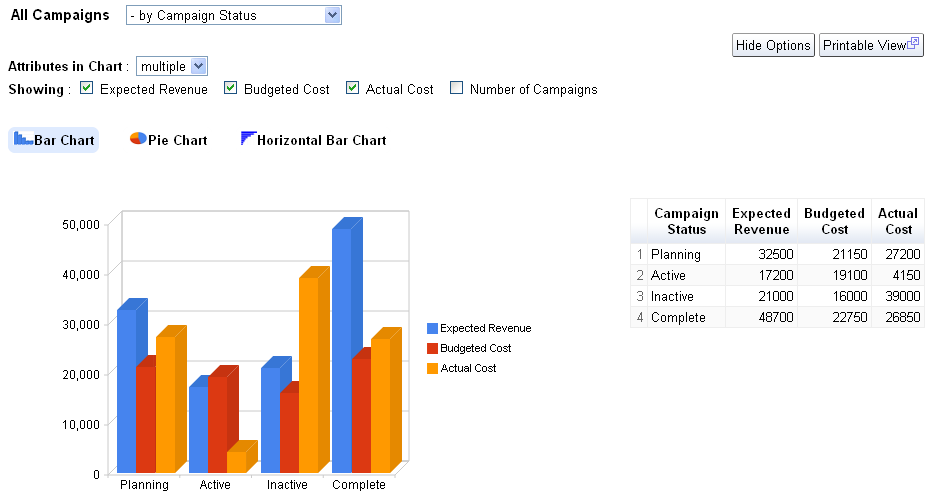
In our iFreeTools CRM, our free CRM app for use with Google Apps, we have enabled this for fields in Expected Revenue, Budgeted Cost and Actual Cost fields in Campaigns and for Amount and Expected Revenue in Opportunities.

The summation of the values from such fields will be listed below the list view as shown in the image below..


Along with this we have also enabled the result of aggregation from multiple attributes to be rendered in the same graph, so that you can compare related aggregation values visually.

The following image shows the chart views for Campaigns enabled to display values from 3 attributes, Expected Revenue, Budgeted Cost and Actual Cost, grouped by Campaign Status..


For your custom online database apps, built over iFreeTools creator you can specify this configuration in the Attribute form, when you add/edit the attribute details.

Note : All aggregation / charting features are currently restricted to work with smaller batch of data. When our Scheduled Reports feature is available, you can create summary / charts for full set of data.

Data-access and Caching functions

New data-access and caching functions listed below have been now added for use with expressions.

user
Usage : user()
Description : Returns the currently logged in user

fetch_one
Usage : fetch_one(entity_name, criteria)
Description : Returns a record for the given entity_name and filtering criteria
Example : fetch_one("Car", {"Company":"Honda", "Name":"City"}) will fetch a record from the entity having Display Name as Car and for the filtering condition to get the record for Honda City.

val_from
Usage : val_from(instance, prop_name)
Description : Returns a value of a property from the given instance.
Example : val_from(user(), "emailId") will return the current user's email-id, where emailId is the alias for the "Email Id" attribute in User system-entity.

cache
Usage : cache(name, expr)
Description : To cache the result of evaluation of expression expr with the given name.

cached_val
Usage : cached_val(name)
Description : Returns the value which was added to cache previously with the given name.


For more details, refer to Data Access and Cache Functions section the user guide.

Search for files to attach from Google Docs

When attaching files from Google Docs to your records, you now have the option to search for the required file based on text, to narrow down the files and attach the required file to your record.


Hope you like the new features.

Do keep sending in your suggestions on how we can make things better in your free online database app builder.

Friday, July 29, 2011

Date-Time and Error Functions now available for use within Expressions

Your favorite online database app builder tool over Google App Engine - iFreeTools Creator, now supports date-time functions within formula field expressions and in validation expressions.

The new date-time functions made available are listed below :


now
Usage : now ()
Description : Returns a datetime object having the current time.

date
Usage : date(year, month, day)
Description : Returns a date object for the given year, month and day values.

datetime
Usage : datetime (year, month, day, hours=0, minutes=0, seconds=0)
Description : Returns a datetime object for the given parameters. If hours, minutes and seconds are not provided, they will be taken to be 0 (zero).

timedelta
Usage : timedelta (days=0, seconds=0, microseconds=0)
Description : Returns a timedelta object representing a difference in time, for the given days, seconds and microseconds. Can be used to add or subtract date/datetime values.
Example: now() + timedelta(1) will give tomorrow's date and time.


We have also added support for raising error messages when validating values using expressions. Apart from detailing on how to enter the value for the field in the description, this function will enable you to specify the reason for the validation failing.


error
Usage : error(error_msg)
Description : Raises an error with the given error_msg. This will be shown in the form for the corresponding attribute which failed the validation expression.


We have also rolled in a new home page for iFreeTools Creator, now highlighting the important features available in the platform.


Keep sending in your valuable suggestions on how you think we can make iFreeTools better for you.

Wednesday, June 29, 2011

Expressions for Computed Formula Fields & Field Validations, now available in iFreeTools

The labs setup of the Google App Engine powered free online database apps creator, now has support for defining and using expressions for calculated formula fields and in validations.

Update : it is now available at http://creator.ifreetools.com too.

Note : When adding new formula expressions, you will need to re-index the existing records to have the formula value computed for those entries.

Formula Expressions

You can now define expressions based on values in other fields in the database record to compute the value of formula field.

For example, you might have First Name and Last Name as fields within your database record and may prefer to have them combined in another Name field. For this you can add the 3 attributes with data-type as Single line text (String) and for the Name attribute you can set the Formula Expression (under Advanced section of the attributes form) to be

val("First Name") + " " + val("Last Name")

The val function enables you to fetch the value of the field for a given display name.

The formula expressions can be set for any data-types, just make sure the return value of the expression is of the required type.

Aliases for fields

You can also set Aliases for the attributes and use them instead of the val functions, to have the formula to be something like

First_Name+" "+Last_Name

Validation Expressions

You can also define validations expressions which need to evaluate to True for the record to be stored into the database.

So, if you have a product code field and it should always be 5 characters in length, you can set the Validation Expression as

len(inputValue) == 5

For more details on the operators and functions available for use within expressions, kindly refer to Using Expressions for Formula-fields and Validations, in our user guide.


Hope you like the new feature. Do keep sending in your suggestions on how you believe we can make this app better for you.